


Bulk Editor for WooCommerce features
Every feature, grouped by what it does. All 22 are in every plan.
$19 a year for one site · or pay once from $49
See the plansEditing
11 features
-
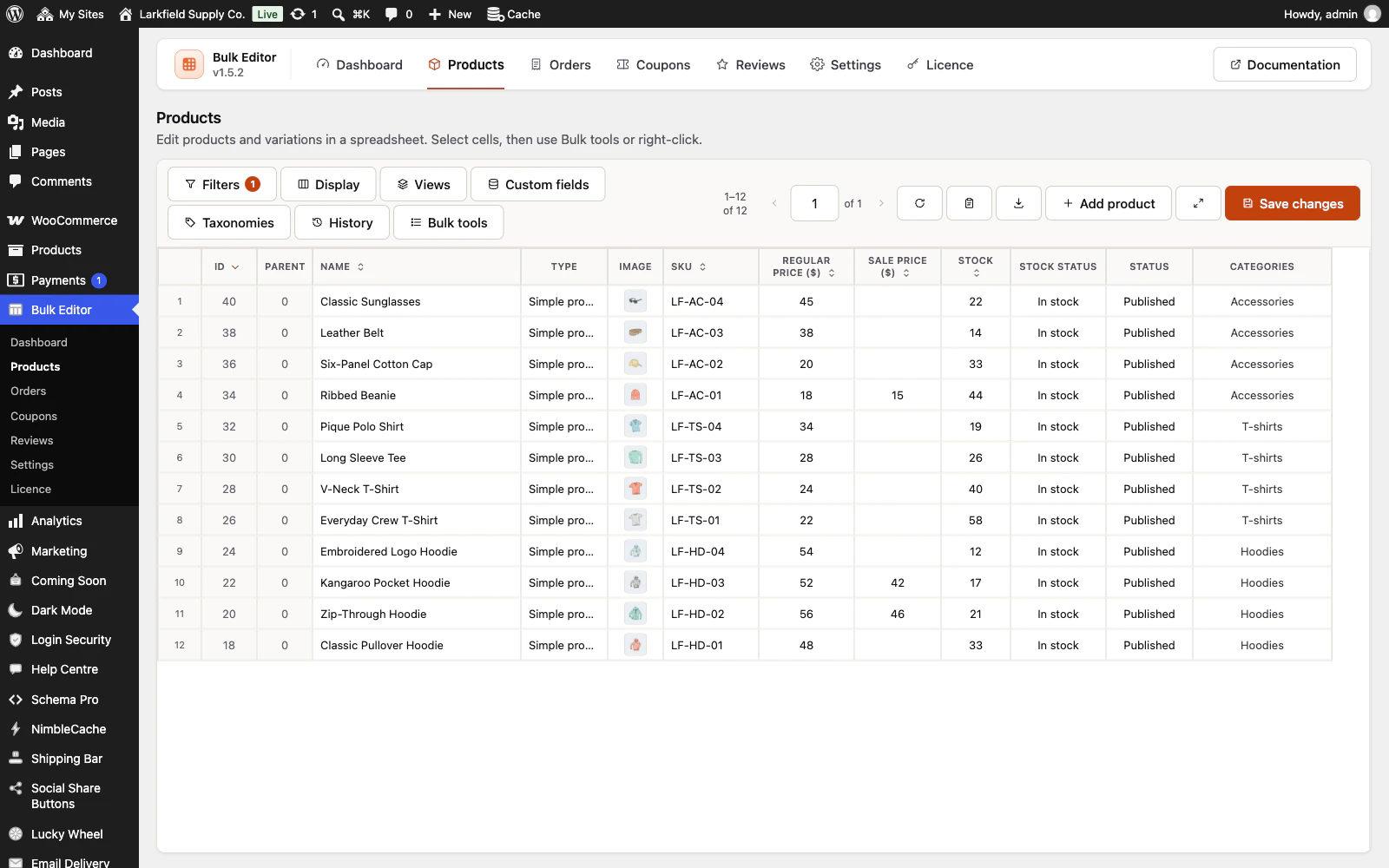
Four editors, one workspace
Products and variations, orders, coupons and reviews each open in a spreadsheet with the same toolbar, filters, display settings, custom fields and history.
More: Four editors, one workspace
Learn it once. Add product and Add coupon put a new draft at the top of the grid; Add order opens WooCommerce's order screen.
-
Every product field
Name, SKU, GTIN, slug, status, prices, sale dates, stock, dimensions, shipping and tax classes, categories, tags, attributes, default attributes, gallery, downloads, linked products, purchase note, visibility, cost of goods and more — plus any custom field you promote to a column.
-
Right-click bulk tools
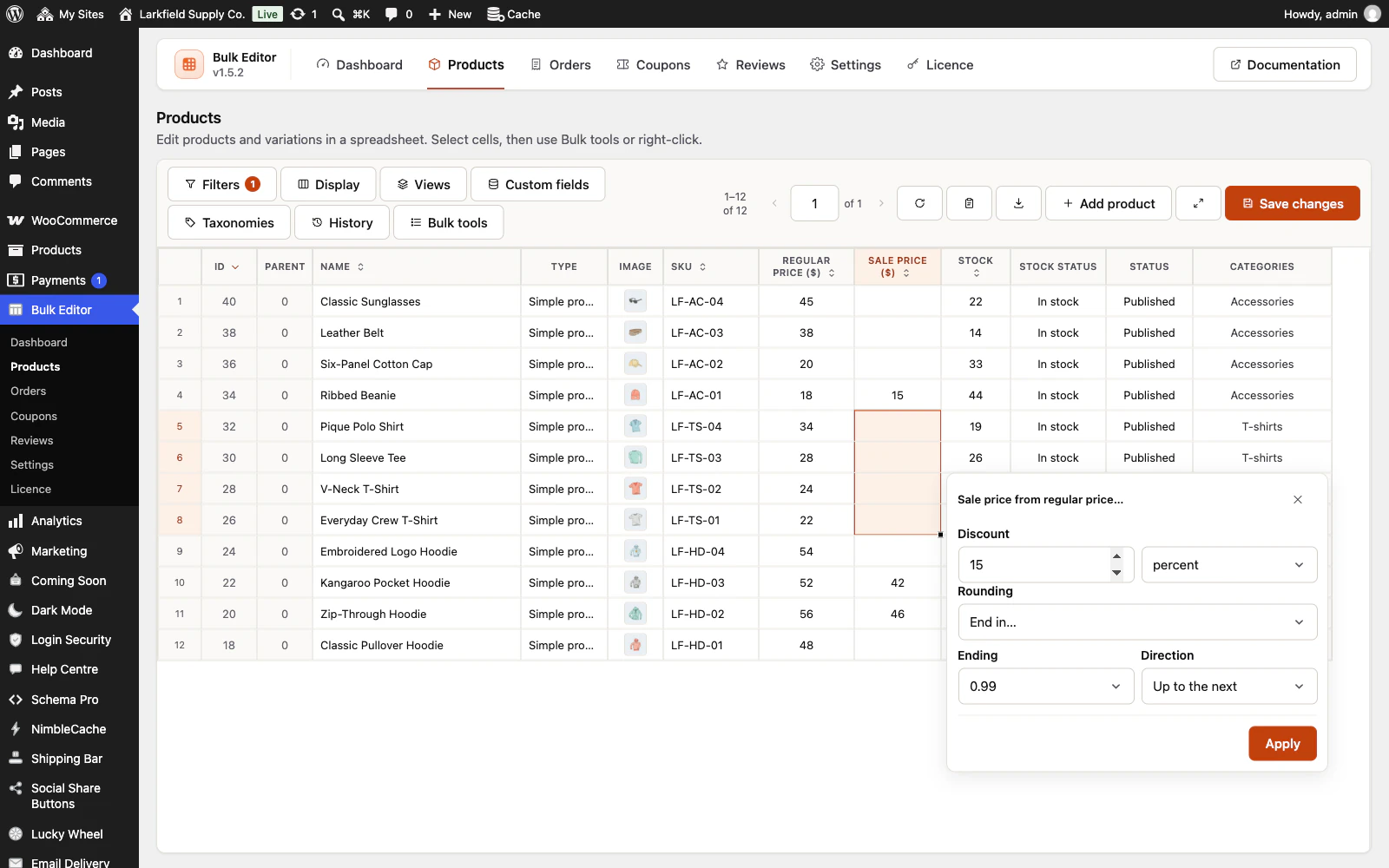
Select cells and right-click: calculate (± amount or percent with rounding), fill a series, set many at once, find and replace, add text, change capitals, pick a date, add images, add or remove attributes, swap tags or options, sale price from regular price.
-
Add words and fix capitals
Put "SALE: " in front of every selected product name, or "Organic" after it, and turn names typed in capitals into Capitalise Each Word, Sentence case, lower case or UPPER CASE.
More: Add words and fix capitals
Capitals follow your shop's language, accents included, and "Men's" stays "Men's". Descriptions take a paragraph of their own, before or after. The first row shows before and after as you type, the whole filtered list can go at once, and one Undo puts it back.
-
Prices that end in .99
When Calculate raises or lowers prices, round the results to end in .99, .95 or an ending you choose, up to the next or to the nearest, or to a step such as 0.05, starting from the price as your shop shows it.
More: Prices that end in .99
The worked example shows the first row's new price before anything is written, the whole filtered list can go at once, and one Undo puts it back. A free product stays free, and an ending or a step never rounds a paid one down to nothing. Shops that price without decimals get endings of 9, 90 and 99.
-
Paste a supplier list
Copy a supplier's SKUs and new prices or stock straight from a spreadsheet, in whatever order its columns are, and paste them into the Products editor.
More: Paste a supplier list
You say which column holds the SKU. Every line is matched by SKU and checked first: each change shown as now and new, and every line left out with the reason, such as an unknown SKU, one two products share, or a price written the wrong way for your shop. Nothing is saved until you apply, and one Undo puts it all back. Or open the supplier's CSV file: it is read in your browser, never uploaded, with semicolon files from a European Excel and their accents read correctly.
-
Prices from another column
Calculate can start from another number column on screen: set regular prices from a cost column plus a margin, or sale prices a percentage below the regular price, across a selection or every record in the list, with the same rounding, a worked example before you apply, and one Undo.
More: Prices from another column
A cost column comes from WooCommerce's cost of goods feature or a numeric custom field.
-
Custom fields as columns
Discover the meta keys on your records, name the column, pick the cell type — text, rich text, number, checkbox, date, select, multi-select, image, gallery or JSON — and switch it on.
More: Custom fields as columns
Text is saved as typed, so SEO title templates such as %%category%% and links with %20 in them survive (HTML is cleaned for anyone not allowed to post it). Extra product taxonomies become columns the same way.
-
Orders without the detour
Statuses, billing and shipping details, payment method, transaction IDs, customer notes and order notes in one grid.
More: Orders without the detour
Right-click to resend invoices, regenerate download permissions or add notes to many orders. Works on the high-performance order tables and on post storage.
-
Coupons in bulk
Generate codes, set discount types and amounts, expiry dates, spend limits, product and category restrictions, allowed emails and usage limits across many coupons at once.
-
Review moderation at speed
Approve, hold or mark as spam, correct ratings, verify owners, edit text, and reply to a selection of reviews with one message.
Finding
4 features
-
Saved views
Save the filters, the columns and their order, the sort and the rows per page under a name, and open them again in one click from the Views menu.
More: Saved views
Keep views to yourself or share them with everyone who can use the editor. Products comes with four ready-made views: no image, no SKU, out of stock and low stock, which follows your store's low stock threshold. A view never keeps unsaved edits.
-
Download what you are looking at
Filter to the products with no image, or everything under five in stock, and the toolbar's download button writes exactly that to a spreadsheet — the filters you have on, the columns you are showing, in the order you have them.
More: Download what you are looking at
Categories come out as names rather than numbers, and the file opens in Excel with its accents intact. Each editor exports only what you may edit. The file is the list as it was when you pressed download, so an order coming in while it is written never makes a row appear twice or go missing; a record deleted meanwhile, or one that stops matching your filters, is left out, and the file says so.
-
Sort the whole list
Press the arrow in a column heading to sort every page of the list, not just the rows on screen: lowest stock first, best sellers first, or what changed most recently.
More: Sort the whole list
Products add read-only Units sold, Average rating, Review count and Last modified columns, hidden until you pick them. Records without a value come last and are never left out, and a saved view keeps the sort.
-
Filters that match the catalogue
Text matches (contains, exact, starts with, empty…), ID lists and ranges, price, stock, weight and size ranges, sale windows, type, status, featured, image present, categories, tags and attributes with any/all/none logic — and the same depth for orders, coupons and reviews.
Safety
2 features
-
Undo by history point
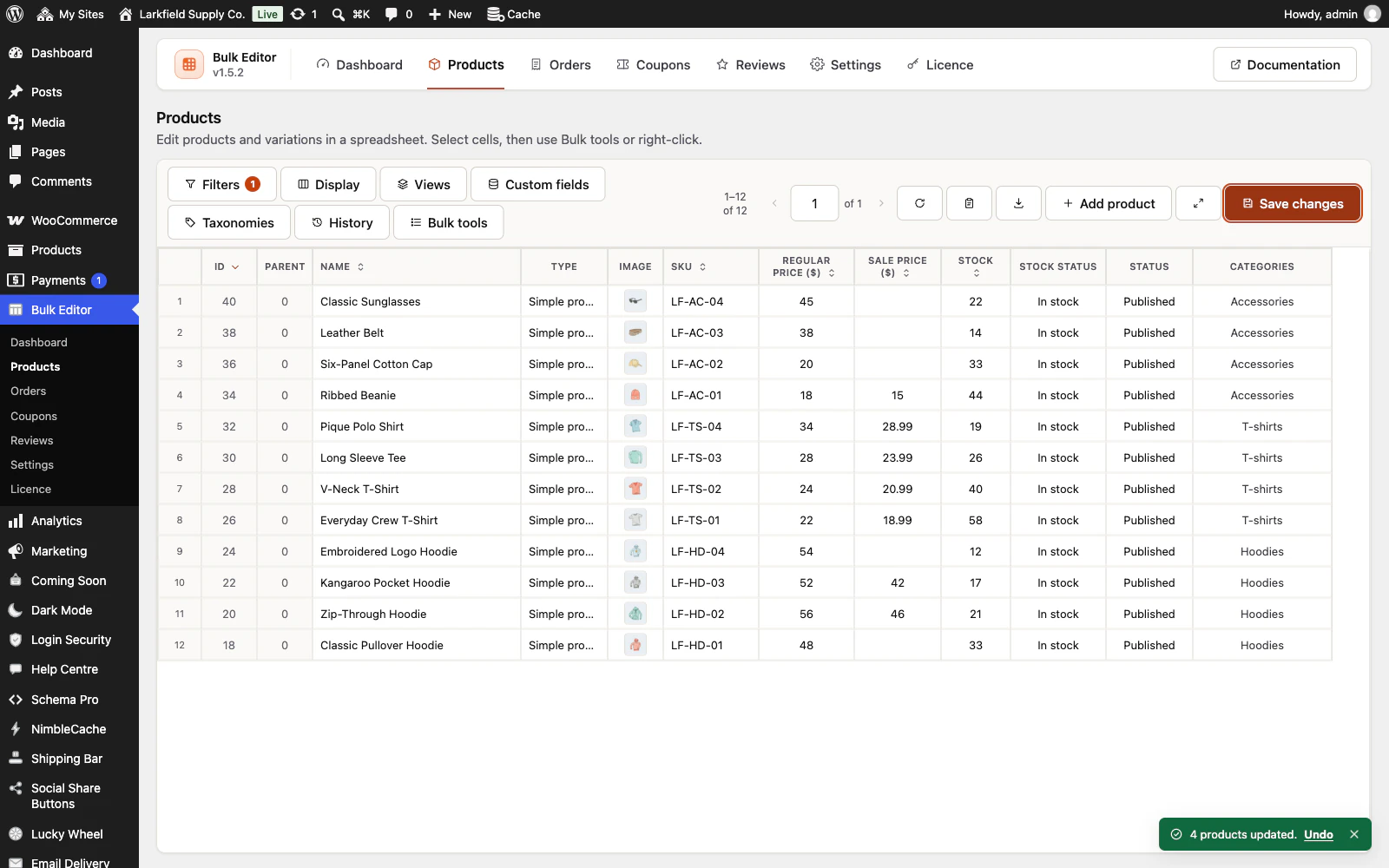
Each save stores the previous value of every changed field.
More: Undo by history point
View a point next to the live values and revert one field, one record or everything. Retention is yours to set. On Orders, an email or a refund record WooCommerce made for a new status stays, so the editor asks before saving one.
-
Saves through WooCommerce
Nothing is written straight to the database.
More: Saves through WooCommerce
Rows go through WooCommerce's own product, order, coupon and comment APIs, so validation, stock rules, lookup tables and caches behave as if you had used the normal screens.
Performance
1 feature
-
Made for large catalogues
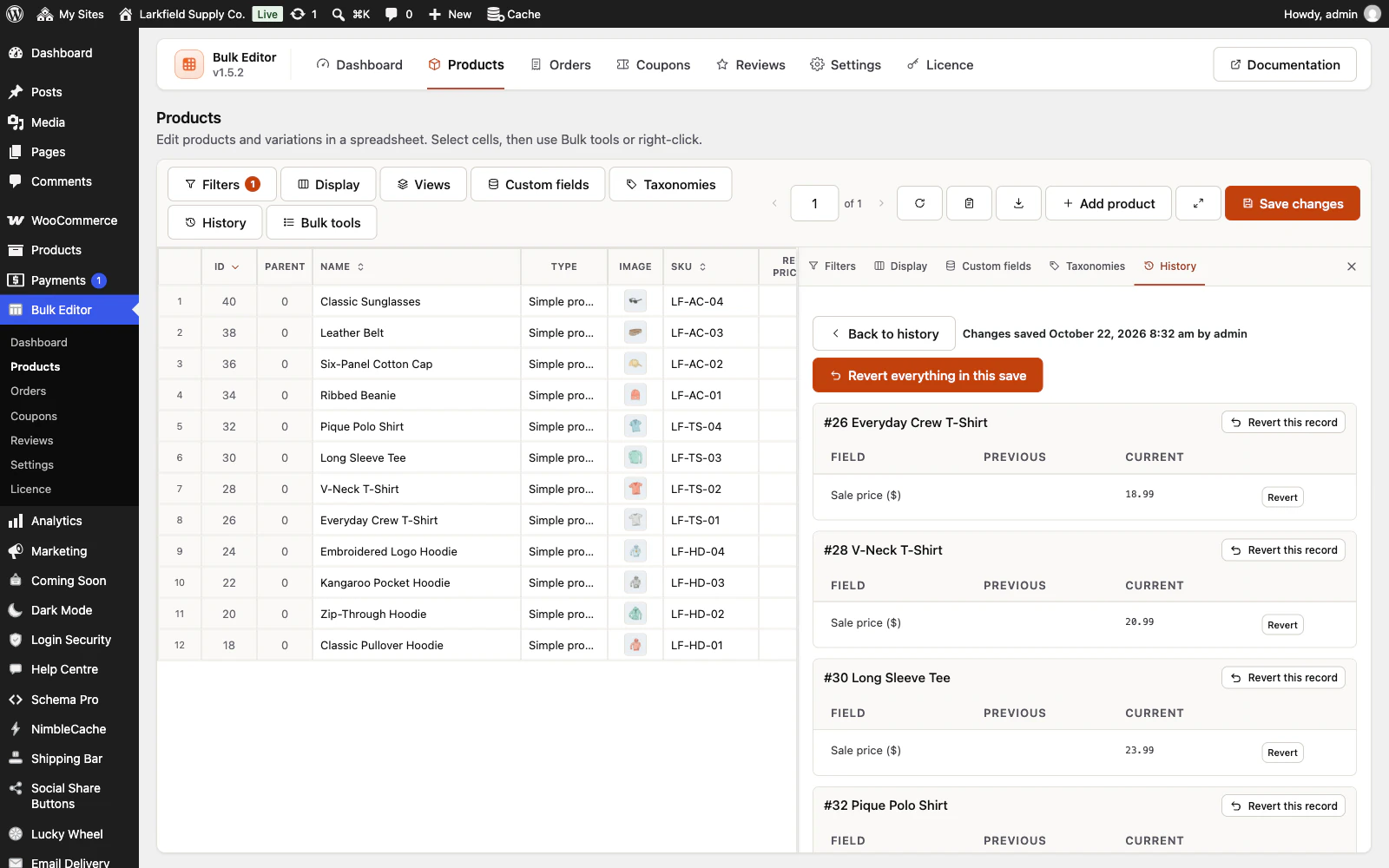
Pages of rows, lazy rendering, batched saves of 20 rows, prepared SQL for every filter, a dedicated history table with indexes.
More: Made for large catalogues
Thousands of products are the normal case, not the edge case.
Everywhere
4 features
-
Spanish and French included
Every label, hint and message ships translated, and the text domain is ready for any other language.
-
An admin that never reloads
Every screen in the plugin arrives without a page load, and every save happens where you are standing.
More: An admin that never reloads
WordPress fetches the whole of wp-admin's CSS and JavaScript again to change one panel; this fetches the panel. The screen you are on is still there while the next one is on its way, and the one you are heading for is usually already in hand — a pointer takes a moment to reach a menu item, and that moment is spent fetching.
-
Saved, and told so where you are looking
A save answers in the corner of the screen, bordered in the colour of what it is telling you and saying what was saved rather than just "Saved".
More: Saved, and told so where you are looking
Four seconds, and hovering holds it open. No reload, and no scrolling back to find a notice above the header three hundred pixels from the button you just pressed.
-
Tabs that change instantly
A WordPress admin request spends about a second in its own bootstrap before a plugin gets a word in, and fetching when your pointer arrives only buys back a fraction of it.
More: Tabs that change instantly
So the plugin's other screens are fetched quietly while you read the first one — one at a time, only while the browser is idle, and never on a metered connection. By the time you click a tab the answer has been in memory for seconds.
Pricing
Every plan includes every feature. Choose how many domains, and whether to pay yearly or once.
Pay yearly renews until you cancel
Pay once (lifetime) no renewals
- Every plan includes every feature. You choose only the number of domains.
- 30-day refund, no reason needed. Refund policy
- Licence key and download straight after payment, by Stripe.
- A lapsed licence stops updates and support. It never switches a feature off.
- Local, development and staging copies are free and do not count against your domains.
- Yearly plans renew at the then-current price until you cancel. Cancel any time from your account.
- Where tax applies it is calculated at checkout and shown before you pay.