


 Bulk Editor for WooCommerce Sell more
Bulk edit WooCommerce products, orders, coupons and reviews
Edit WooCommerce products, orders, coupons and reviews in one spreadsheet, paste supplier lists by SKU, undo your edits.

$19 a year for 1 domain 5 domains $29 · unlimited $39 · or pay once from $49
- 30-day refund, no reason needed
- Every feature in every plan
- Support from the developers
- Tested with WordPress
- 6.0 to 7.1
- WooCommerce
- 7.0 to 11.0
- PHP
- 8.0 or later
- Multisite
- Network activation
- Languages
- English, Spanish, French
- Latest version
- 1.7.0 · 23 Oct 2026
What it does
-
Change a hundred prices in one go
Edit prices, stock and fields straight in the grid, the way a spreadsheet works.
-
See every stock level on one screen
See stock across the whole catalogue at once and fix it in place, without opening a product.
-
Fix it, then un-fix it
Every bulk change is a history point you can roll back, so a wrong edit is never permanent.
-
Orders, coupons and reviews too
The same editor for orders, coupons and reviews — not just products.
See it working
Captured from a working WordPress site, not drawn. Select one to see it full size.
-

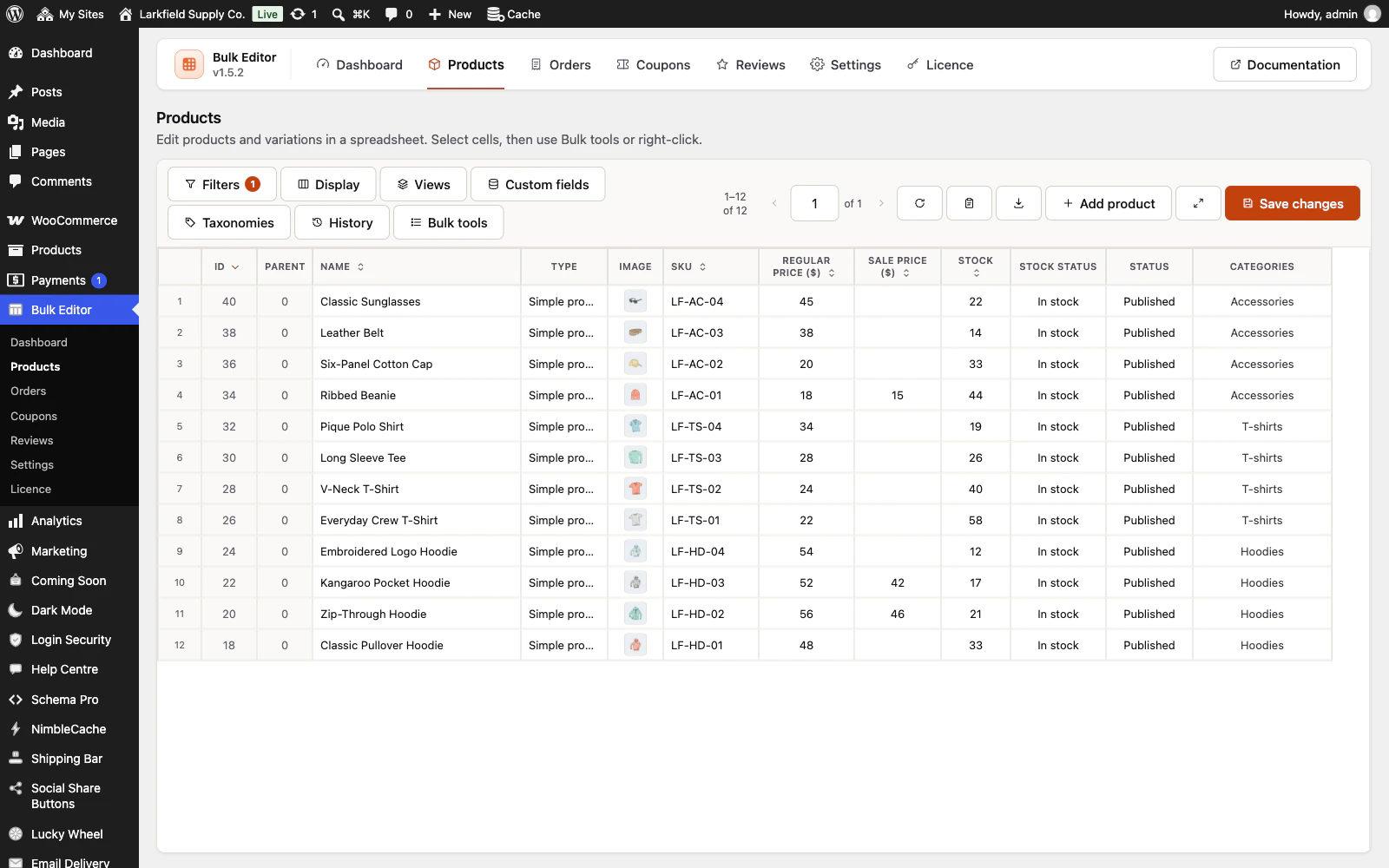
Every product in one grid, filtered to the ones you mean, ready to edit like a spreadsheet. -

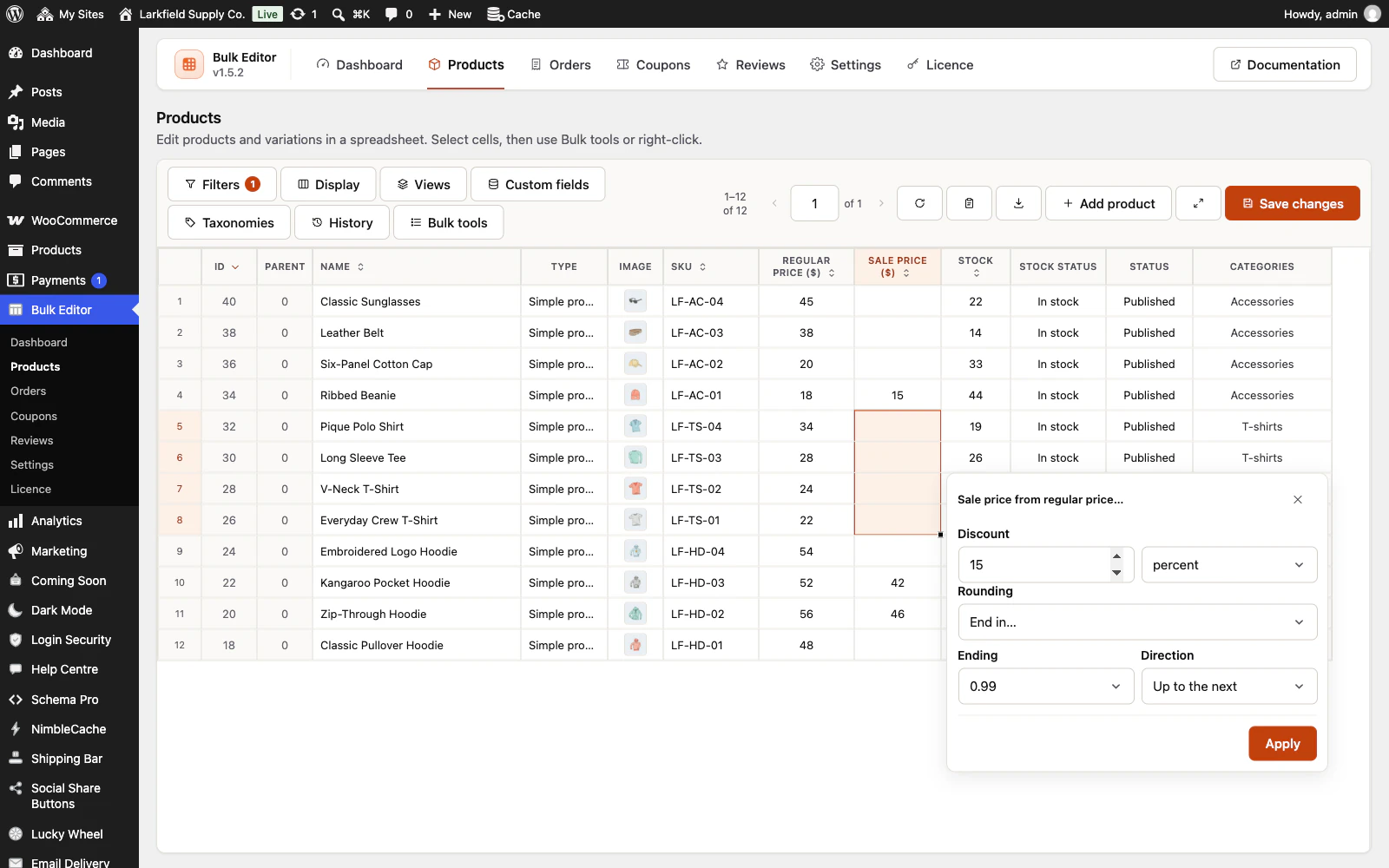
Select a column of cells and set a sale price from the regular price, 15 percent off and ending in .99. -

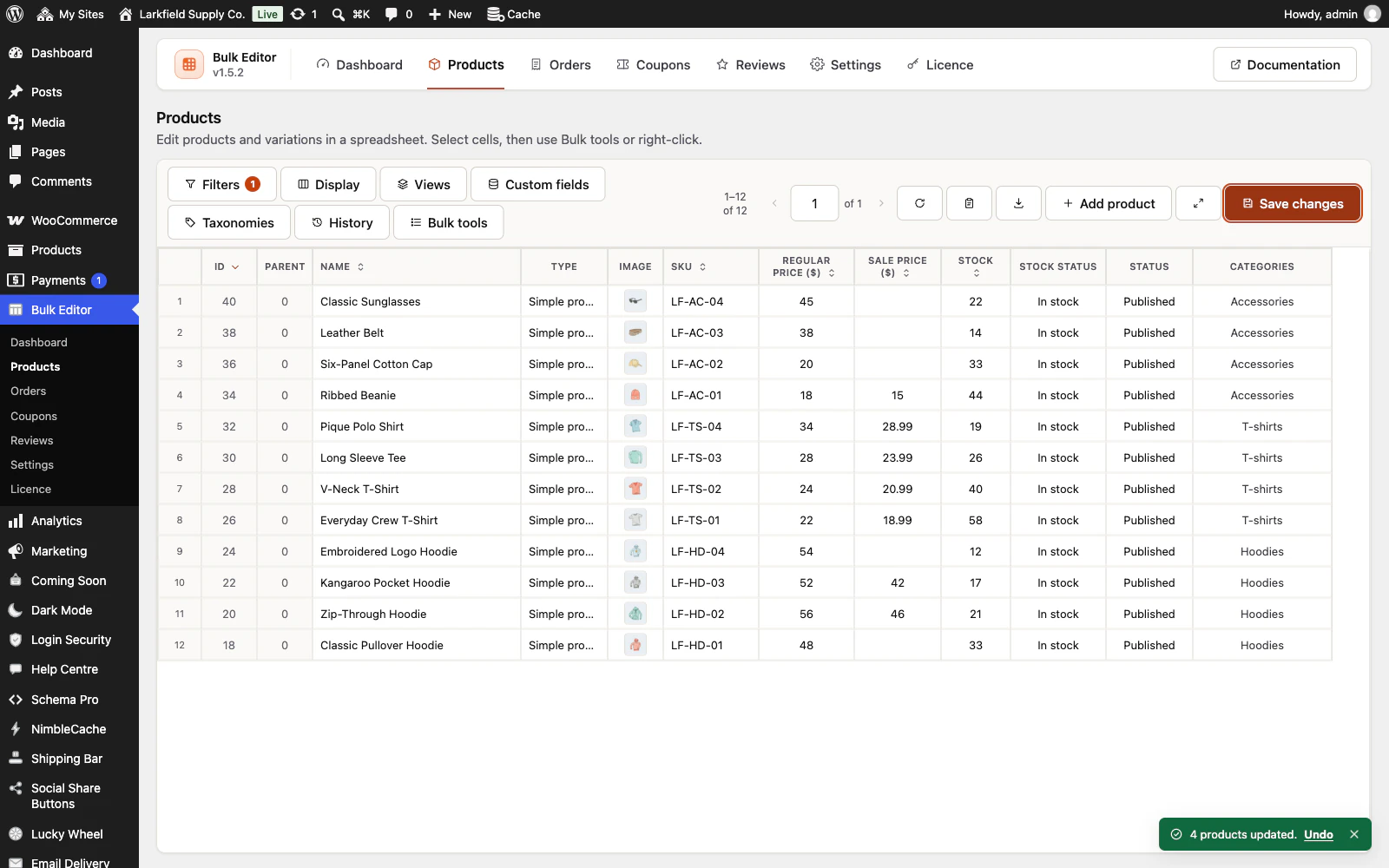
The new prices are saved through WooCommerce, and the message that says so has an Undo button. -

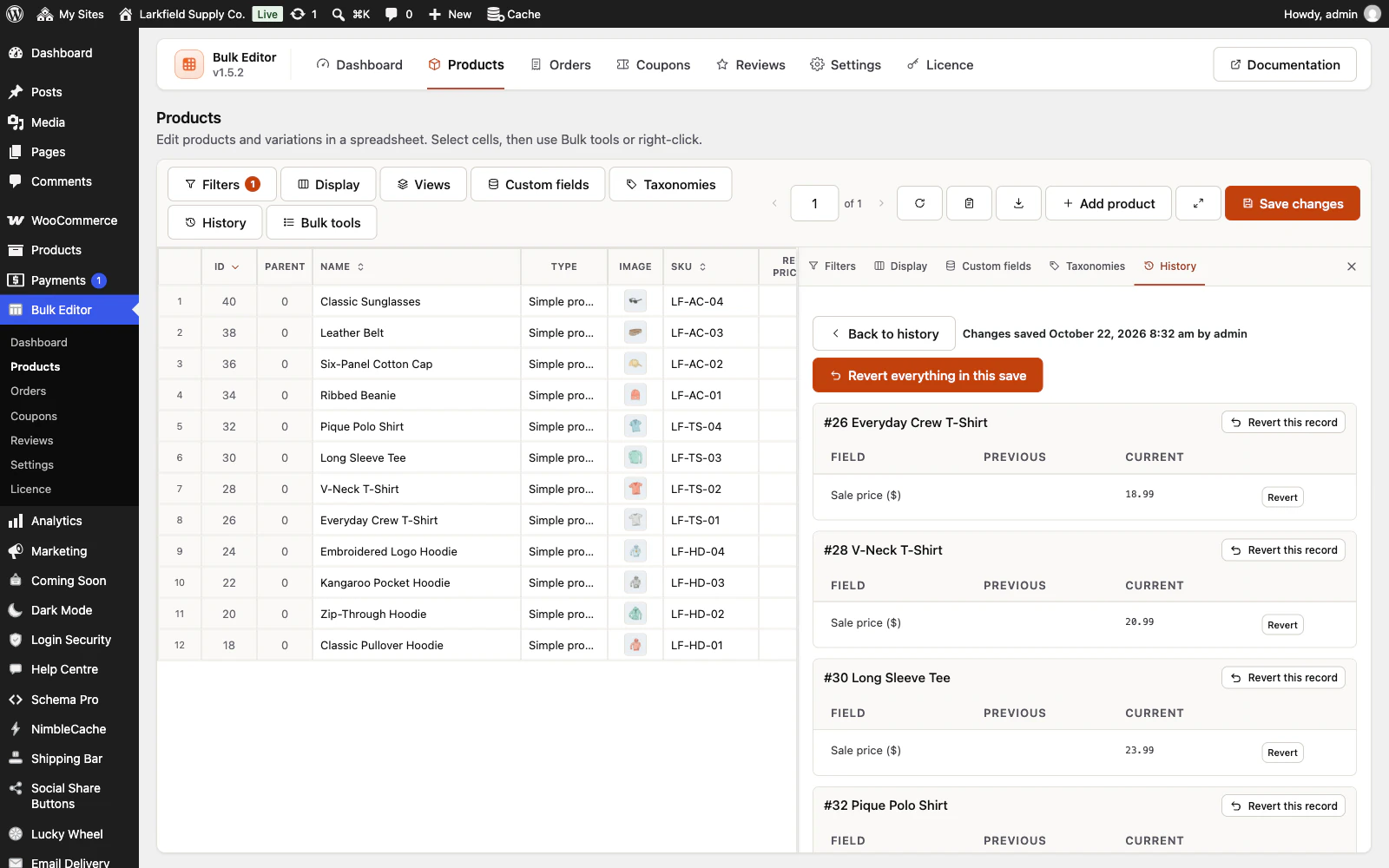
History keeps the previous value of every field a save changed, so a whole save, one product or one field can be put back.
Features
See all 22 features- Four editors, one workspace Editing
- Every product field Editing
- Right-click bulk tools Editing
- Add words and fix capitals Editing
- Prices that end in .99 Editing
- Paste a supplier list Editing
Pricing
Choose how many domains, and whether to pay yearly or once.
Pay yearly renews until you cancel
Pay once (lifetime) no renewals
- Every plan includes every feature. You choose only the number of domains.
- 30-day refund, no reason needed. Refund policy
- Licence key and download straight after payment, by Stripe.
- A lapsed licence stops updates and support. It never switches a feature off.
- Local, development and staging copies are free and do not count against your domains.
- Yearly plans renew at the then-current price until you cancel. Cancel any time from your account.
- Where tax applies it is calculated at checkout and shown before you pay.
Questions
About the plugin first, then how your licence works.
Does Bulk Editor work with WooCommerce HPOS order storage?
Yes. Bulk Editor reads and writes orders through WooCommerce's own order API, so it works on the high-performance order tables and on the older post storage, and its filters and sorting run on whichever one your shop uses. It needs WooCommerce 7.0 or later.
Can Bulk Editor edit product variations?
Yes. Bulk Editor lists each variable product's variations as rows under it, up to 500 variation rows a page, and you edit them like any other row. Cells that do not apply, such as a price on the variable parent or categories on a variation, are grey and locked.
What if I make a mistake with Bulk Editor?
Bulk Editor keeps every save as a history point. Press Undo on the message after a save, or open History to revert one field, one record or a whole save. Deleted variations cannot be brought back, and an email WooCommerce sent for a new order status stays sent.
Can Bulk Editor import a CSV file from my supplier?
Not as an import, but Paste a list opens the supplier's CSV file: press Open a file..., choose the SKU and new value columns, and check every change before it saves, up to 5,000 lines at a time. The file is read in your browser and not uploaded. Exporting the current view to CSV works too.
Will Bulk Editor cope with a large catalogue?
Yes. Bulk Editor loads a page of up to 200 products at a time, draws rows lazily and saves in batches of 20 rows. To change every record a filter matches across all its pages, use Apply to: All N records in this list. An export stops at 50,000 rows and says so in the file.
What happens to my data if I delete Bulk Editor?
Bulk Editor never touches your catalogue when it is removed: products, orders, coupons and reviews stay as they were last saved. Its own edit history, saved views and settings are kept too, unless you switch on Delete all data on uninstall under Settings first.
How your licence works
How do I install it?
After checkout you get a licence key and a download link straight away, plus an email copy. Upload the ZIP under Plugins → Add New, activate it, and paste your key into the plugin settings.
How do updates work?
Once your key is entered, new versions appear on your Plugins screen and install with one click, exactly like a plugin from the WordPress directory.
What happens when my licence expires?
The plugin keeps working. You only lose access to new updates and support until you renew.
Do staging sites use up a domain?
No. Local, development and staging copies are free and unlimited: localhost, private IP addresses, domains ending in .test, .local or .localhost, and subdomains beginning with staging. or dev. None of them counts against your plan.
Read before you buy
The documentation and answers are open to everyone.
- Documentation14 sections, open before you buy
- Answers37 questions people ask, answered
- ChangelogEvery version with its date. 1.7.0, 23 Oct 2026: Open a supplier's CSV file in Paste a list. First released 21 Aug 2026.
- GuideHow to change WooCommerce prices in bulk, and undo it
- GuideUpdate WooCommerce prices and stock from a supplier's spreadsheet