


 Email Delivery by Traslatability Speed and delivery
A WordPress SMTP plugin that shows what happened to every message
Send your site's email through a real mail service, and see what happened to every message.
![The Send a test screen of Email Delivery in WordPress admin. A red box reads It did not go. SMTP Error: Could not authenticate. Below, a panel headed What the mail server said, noting it is safe to paste into a support request, shows the full conversation with smtp.sendgrid.net, the sign-in lines replaced by [credentials hidden], ending in 535 Authentication failed: The provided authorization grant is invalid, expired, or revoked.](https://www.traslatability.com/wp-content/themes/traslatability/assets/screens/email-delivery-by-traslatability/crops/01-test-transcript-d.webp?ver=1792726162)
$19 a year for 1 domain 5 domains $29 · unlimited $39 · or pay once from $49
- 30-day refund, no reason needed
- Every feature in every plan
- Support from the developers
- Tested with WordPress
- 6.0 to 7.1
- PHP
- 8.0 or later
- Multisite
- Network activation
- Languages
- English, Spanish, French
- Updates
- From your Plugins screen
- Latest version
- 1.7.0 · 23 Oct 2026
What it does
-
Your site's email goes out through a real mail service
Out of the box, WordPress email has no sending reputation and often ends up in spam. Sending through a mail service is the usual fix.
-
A failure comes with the reason, not just the word "failed"
You see the whole conversation with the mail server, so you read the actual reason: an unverified address, a refused password, a blocked connection.
-
You can answer "I never got it"
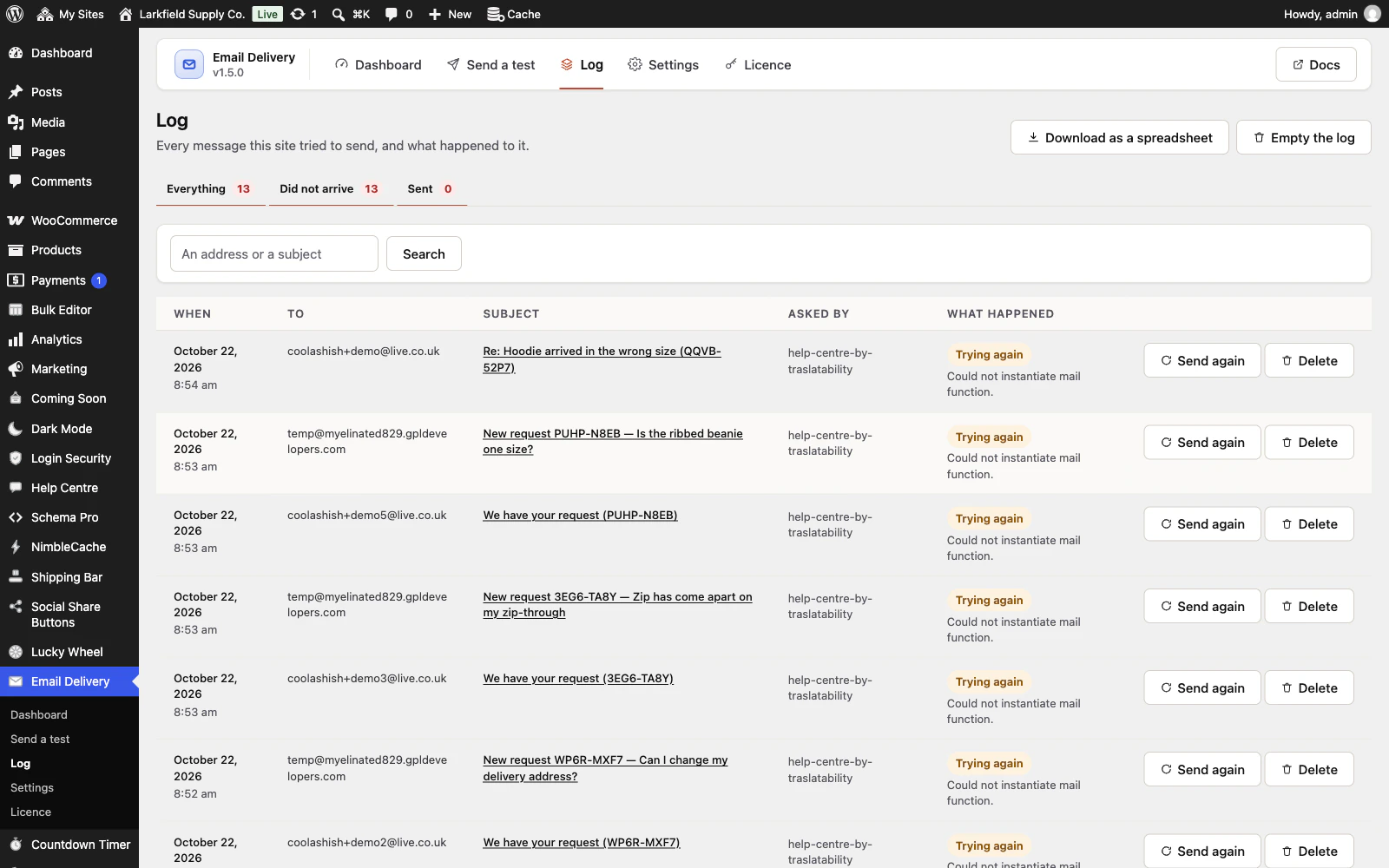
Every message is recorded: who it went to, its subject, which plugin asked for it and whether the mail server took it.
-
A message that is refused is not simply lost
WordPress drops a message a busy mail server refuses. Here it is kept and tried again, and you are told if it cannot be sent.
See it working
Captured from a working WordPress site, not drawn. Select one to see it full size.
-
![The Send a test screen of Email Delivery in WordPress admin. A red box reads It did not go. SMTP Error: Could not authenticate. Below, a panel headed What the mail server said, noting it is safe to paste into a support request, shows the full conversation with smtp.sendgrid.net, the sign-in lines replaced by [credentials hidden], ending in 535 Authentication failed: The provided authorization grant is invalid, expired, or revoked.](https://www.traslatability.com/wp-content/themes/traslatability/assets/screens/email-delivery-by-traslatability/crops/01-test-transcript-800.webp?ver=1792726162)
A test that failed, and the mail server's own answer: here, SendGrid refusing a key that is not valid, with the username and password taken out. -

The log lists every message the site tried to send: who it was for, the subject, which plugin asked for it, and what happened. -

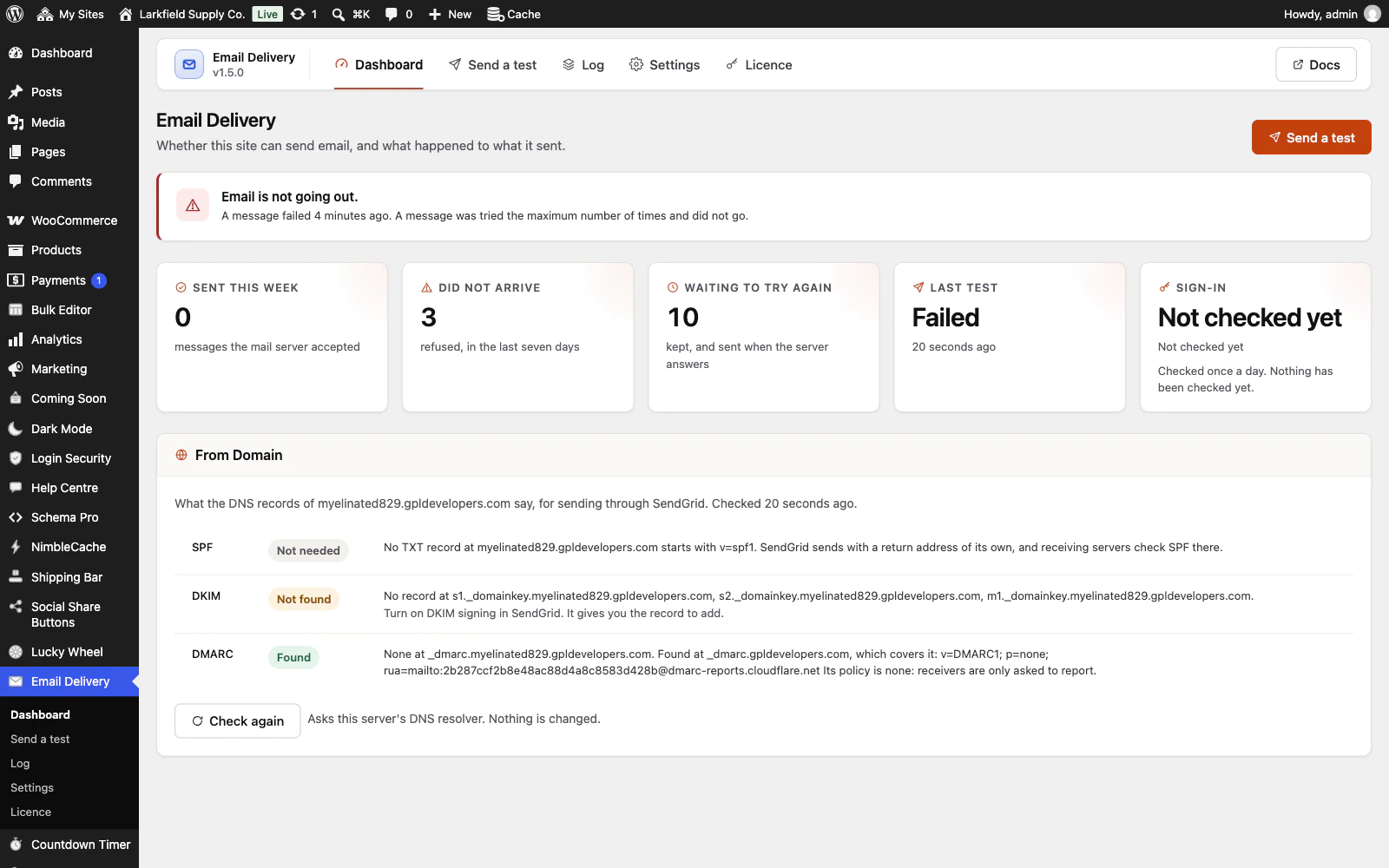
The dashboard says in one sentence whether email is going out, then the numbers, and checks the sending domain's SPF, DKIM and DMARC records. -

Pick a mail service and the server, port and encryption are filled in, with a line saying what that service really wants as a username.
![The Send a test screen of Email Delivery in WordPress admin. A red box reads It did not go. SMTP Error: Could not authenticate. Below, a panel headed What the mail server said, noting it is safe to paste into a support request, shows the full conversation with smtp.sendgrid.net, the sign-in lines replaced by [credentials hidden], ending in 535 Authentication failed: The provided authorization grant is invalid, expired, or revoked.](https://www.traslatability.com/wp-content/themes/traslatability/assets/screens/email-delivery-by-traslatability/01-test-transcript.webp?ver=1792684944)

Features
See all 21 features- Send through a real mail service Getting it arriving
- A test that tells you what is wrong Getting it arriving
- Copies of your site never email your customers Getting it arriving
- Every message, and what happened to it Knowing what happened
- A refused message is kept and tried again Knowing what happened
- A backup connection, tried at once Getting it arriving
Pricing
Choose how many domains, and whether to pay yearly or once.
Pay yearly renews until you cancel
Pay once (lifetime) no renewals
- Every plan includes every feature. You choose only the number of domains.
- 30-day refund, no reason needed. Refund policy
- Licence key and download straight after payment, by Stripe.
- A lapsed licence stops updates and support. It never switches a feature off.
- Local, development and staging copies are free and do not count against your domains.
- Yearly plans renew at the then-current price until you cancel. Cancel any time from your account.
- Where tax applies it is calculated at checkout and shown before you pay.
Questions
About the plugin first, then how your licence works.
Which mail services does Email Delivery work with?
Email Delivery sends through Gmail, Microsoft 365, SendGrid, Mailgun, Postmark, Brevo, Mailjet, SMTP2GO, Amazon SES, Zoho, Fastmail or any mail server of your own. Pick the service and the host, port and encryption are filled in. It does not sign in to Microsoft 365 the newer way (OAuth), only with a password.
Will Email Delivery conflict with WooCommerce or my contact form plugin?
Email Delivery should not conflict with them: it does not replace WordPress's own sending function, so WooCommerce and your forms keep sending the way they always have, through the mail service you set. If you also run another SMTP plugin, switch one of them off: two plugins setting up the same mailer is the one real clash.
Does Email Delivery keep a copy of every email my site sends?
Email Delivery keeps a record of every message but not the message itself: who it went to, its subject, which plugin sent it, when, and whether the mail server took it. The body is stored only if you switch on Keep the message itself as well, or while a refused message waits to be sent again.
Will Email Delivery stop my WordPress emails going to spam?
Email Delivery sends through a mail service that receiving servers trust, and its From Domain panel checks your SPF, DKIM and DMARC records and says what to fix. It cannot promise the inbox, because receiving servers also weigh a message's wording and links, which it does not look at.
What happens to my settings and email log if I delete Email Delivery?
Email Delivery keeps them. Deactivating or deleting the plugin removes nothing unless you first turn on Delete the settings and the log when the plugin is deleted, under Settings, When uninstalling. Only the results of its own checks, such as the last test, always go with it.
Does Email Delivery work on a WordPress multisite network?
Yes. Network-activate Email Delivery and every site is set up, including sites added later. Each site keeps its own settings, its own log, its own daily sign-in check and its own alerts.
How your licence works
How do I install it?
After checkout you get a licence key and a download link straight away, plus an email copy. Upload the ZIP under Plugins → Add New, activate it, and paste your key into the plugin settings.
How do updates work?
Once your key is entered, new versions appear on your Plugins screen and install with one click, exactly like a plugin from the WordPress directory.
What happens when my licence expires?
The plugin keeps working. You only lose access to new updates and support until you renew.
Do staging sites use up a domain?
No. Local, development and staging copies are free and unlimited: localhost, private IP addresses, domains ending in .test, .local or .localhost, and subdomains beginning with staging. or dev. None of them counts against your plan.
Read before you buy
The documentation and answers are open to everyone.
- Documentation17 sections, open before you buy
- Answers24 questions people ask, answered
- ChangelogEvery version with its date. 1.7.0, 23 Oct 2026: Set the mail connection in wp-config.php. First released 14 Sep 2026.
- GuideWooCommerce emails not sending: find the cause in ten minutes
- GuideWordPress emails going to spam: SPF, DKIM and DMARC in plain words