


 Login Security by Traslatability Protect and comply
Limit login attempts and add two-step sign-in to WordPress
Stop the machines guessing at your passwords, and see exactly who has been trying.

$19 a year for 1 domain 5 domains $29 · unlimited $39 · or pay once from $49
- 30-day refund, no reason needed
- Every feature in every plan
- Support from the developers
- Tested with WordPress
- 6.0 to 7.1
- PHP
- 8.0 or later
- Multisite
- Network activation
- Languages
- English, Spanish, French
- Updates
- From your Plugins screen
- Latest version
- 1.6.0 · 23 Oct 2026
What it does
-
Password guessers are locked out, for longer each time
After five wrong passwords from one address in fifteen minutes, that address waits, and each time it comes back the wait is three times longer.
-
Turned away before the slow password check
Checking a password is slow on purpose. A locked-out address is turned away before WordPress looks anything up, so each guess costs one database read.
-
You can see what has been happening
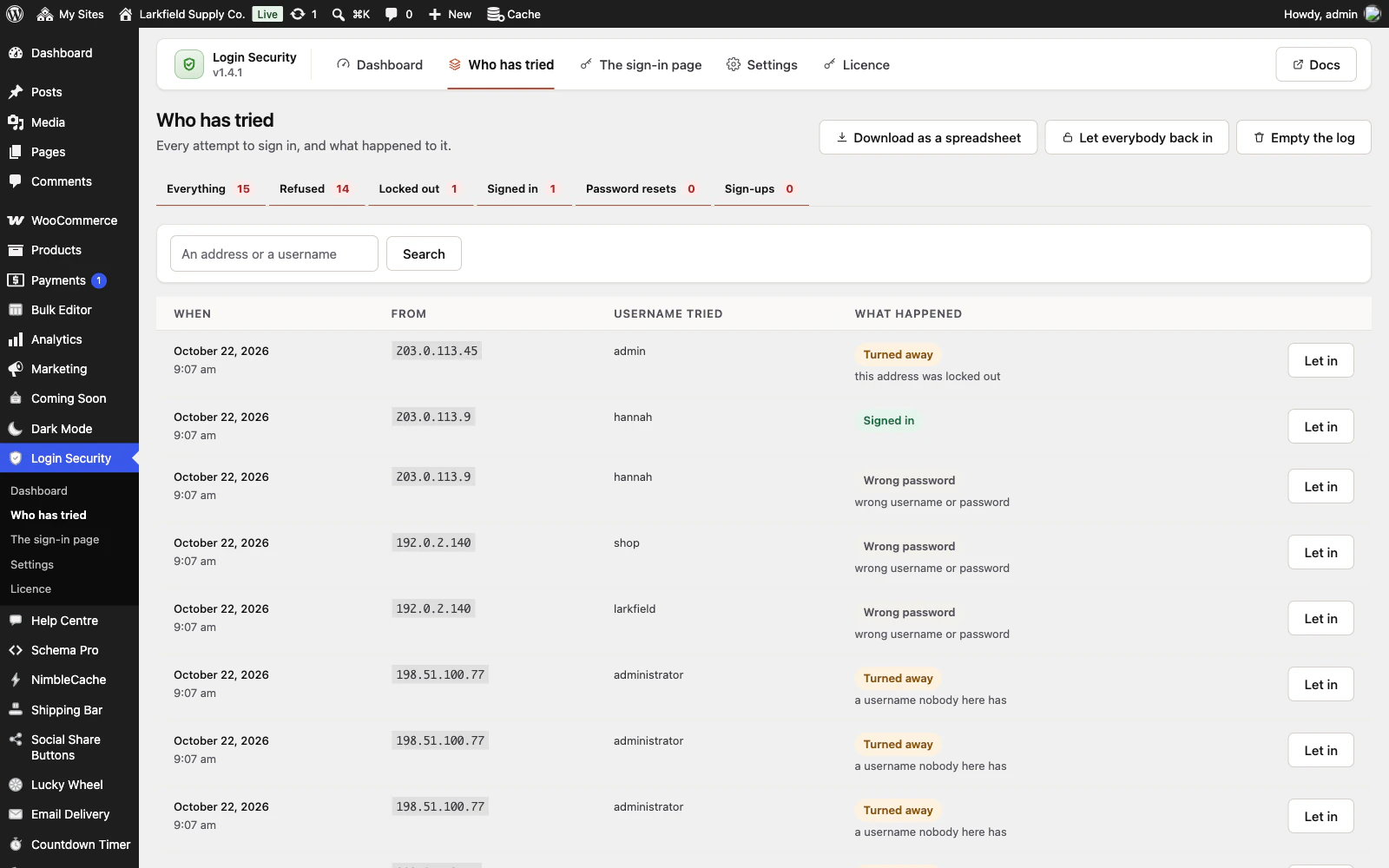
Every attempt is written down with the address, the username typed and what happened, and you see which tried names are real accounts.
-
You cannot be locked out of your own site
Signed-in administrators are never locked out, the address you switched it on from is trusted, and a recovery link works from anywhere.
See it working
Captured from a working WordPress site, not drawn. Select one to see it full size.
-

The first screen says what has been happening at the sign-in page, and shows why you cannot lock yourself out. -

Every attempt is written down: when, from which address, which username was typed, and what happened to it. -

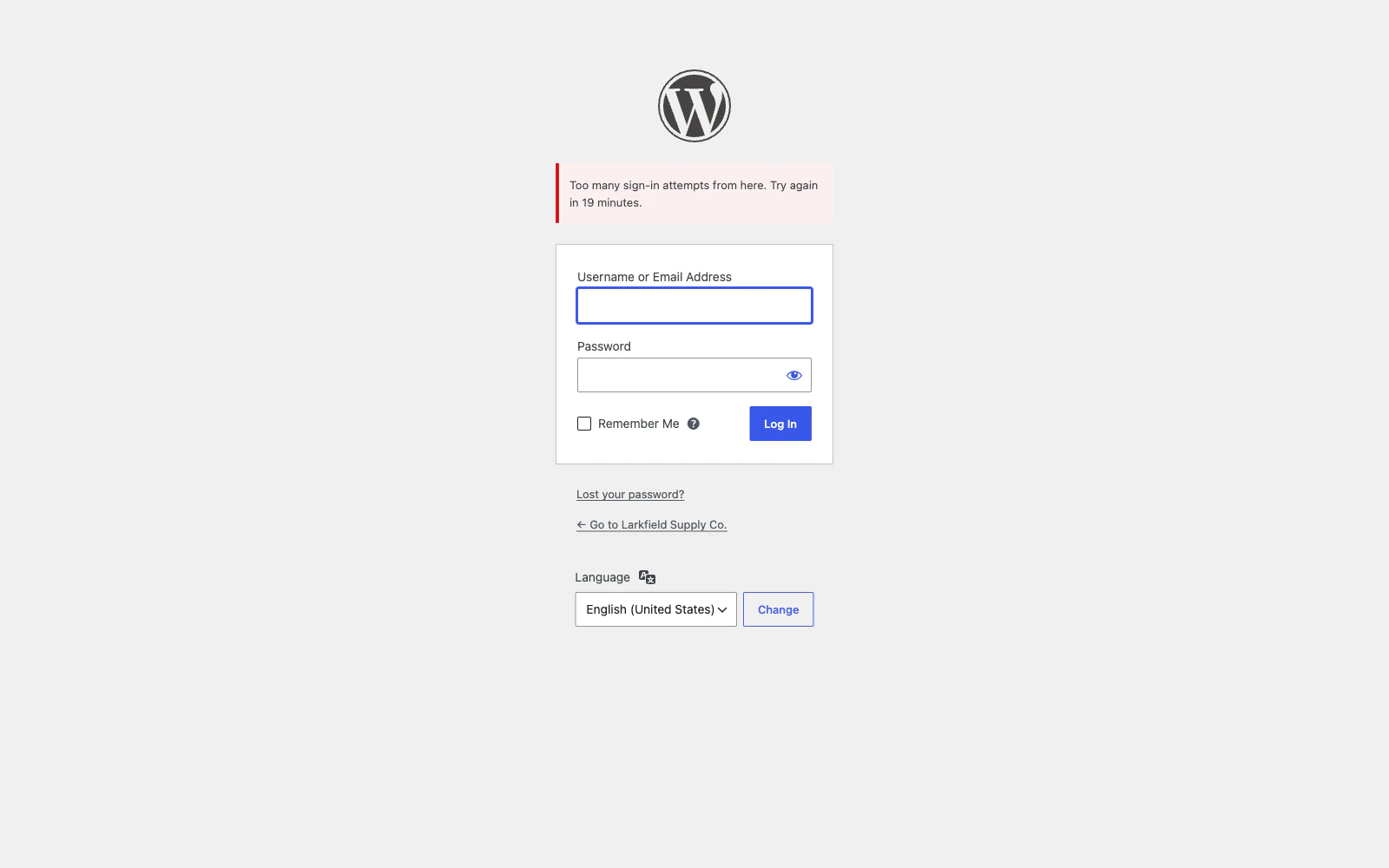
After five wrong passwords, that address is refused at the sign-in page before any password is checked. -

The settings: how many wrong passwords and for how long, one username tried from many addresses, and the addresses that are never locked out.


Features
See all 20 features- Five wrong passwords and you are out Stopping the guessing
- It also catches the slow, spread-out kind Stopping the guessing
- Refused before the password is checked Stopping the guessing
- Usernames nobody on your site has Stopping the guessing
- A second step, with nothing sent anywhere Stopping the guessing
- Refuse a password a machine would find Stopping the guessing
Pricing
Choose how many domains, and whether to pay yearly or once.
Pay yearly renews until you cancel
Pay once (lifetime) no renewals
- Every plan includes every feature. You choose only the number of domains.
- 30-day refund, no reason needed. Refund policy
- Licence key and download straight after payment, by Stripe.
- A lapsed licence stops updates and support. It never switches a feature off.
- Local, development and staging copies are free and do not count against your domains.
- Yearly plans renew at the then-current price until you cancel. Cancel any time from your account.
- Where tax applies it is calculated at checkout and shown before you pay.
Questions
About the plugin first, then how your licence works.
Can Login Security lock me out of my own site?
Login Security is built so it does not: a signed-in administrator is never locked out, and the address you switched it on from is trusted automatically. A recovery link lets you in from any address for an hour, and WP-CLI can lift every lockout. Moving the sign-in page is the one setting that catches people, so it is off until you switch it on.
Does Login Security add two-factor sign-in for WooCommerce customers too?
Yes. Login Security asks for six digits from any authenticator app after the password, such as Google Authenticator, 1Password or Bitwarden, with ten recovery codes. Nothing goes by text message or through another service. Shop customers set it up on a Two-step sign-in tab in WooCommerce My Account.
Will Login Security slow my site down?
No. Login Security loads nothing for visitors and runs no query on a page that is not a sign-in. An attempt from a locked-out address is refused before WordPress looks up the user or checks the password, so each guess costs your server one database read.
Does Login Security work behind Cloudflare and with Jetpack?
Yes. Login Security reads the visitor's real address from the headers Cloudflare and the common proxies set. Its default XML-RPC setting blocks only the one call that can carry hundreds of password guesses in a single request, so Jetpack and the WordPress mobile app keep working.
Is Login Security a firewall or a malware scanner?
No. Login Security protects the sign-in and nothing else: it limits guessing, adds a second step, refuses weak passwords if you ask it to, and records every attempt. It is not a firewall, it does not scan for malware and it does not read your files.
What happens to my settings and log if I delete Login Security?
Deactivating Login Security changes nothing. Deleting it keeps your settings, log and everyone's second step unless you switched on the delete option in Settings first. Every lockout is lifted on uninstall either way, so nobody is left locked out by a plugin that is gone.
How your licence works
How do I install it?
After checkout you get a licence key and a download link straight away, plus an email copy. Upload the ZIP under Plugins → Add New, activate it, and paste your key into the plugin settings.
How do updates work?
Once your key is entered, new versions appear on your Plugins screen and install with one click, exactly like a plugin from the WordPress directory.
What happens when my licence expires?
The plugin keeps working. You only lose access to new updates and support until you renew.
Do staging sites use up a domain?
No. Local, development and staging copies are free and unlimited: localhost, private IP addresses, domains ending in .test, .local or .localhost, and subdomains beginning with staging. or dev. None of them counts against your plan.
Read before you buy
The documentation and answers are open to everyone.