


Cookie Consent features
Every feature, grouped by what it does. All 23 are in every plan.
$19 a year for one site · or pay once from $49
See the plansWhat it actually does
8 features
-
The scripts really are held back
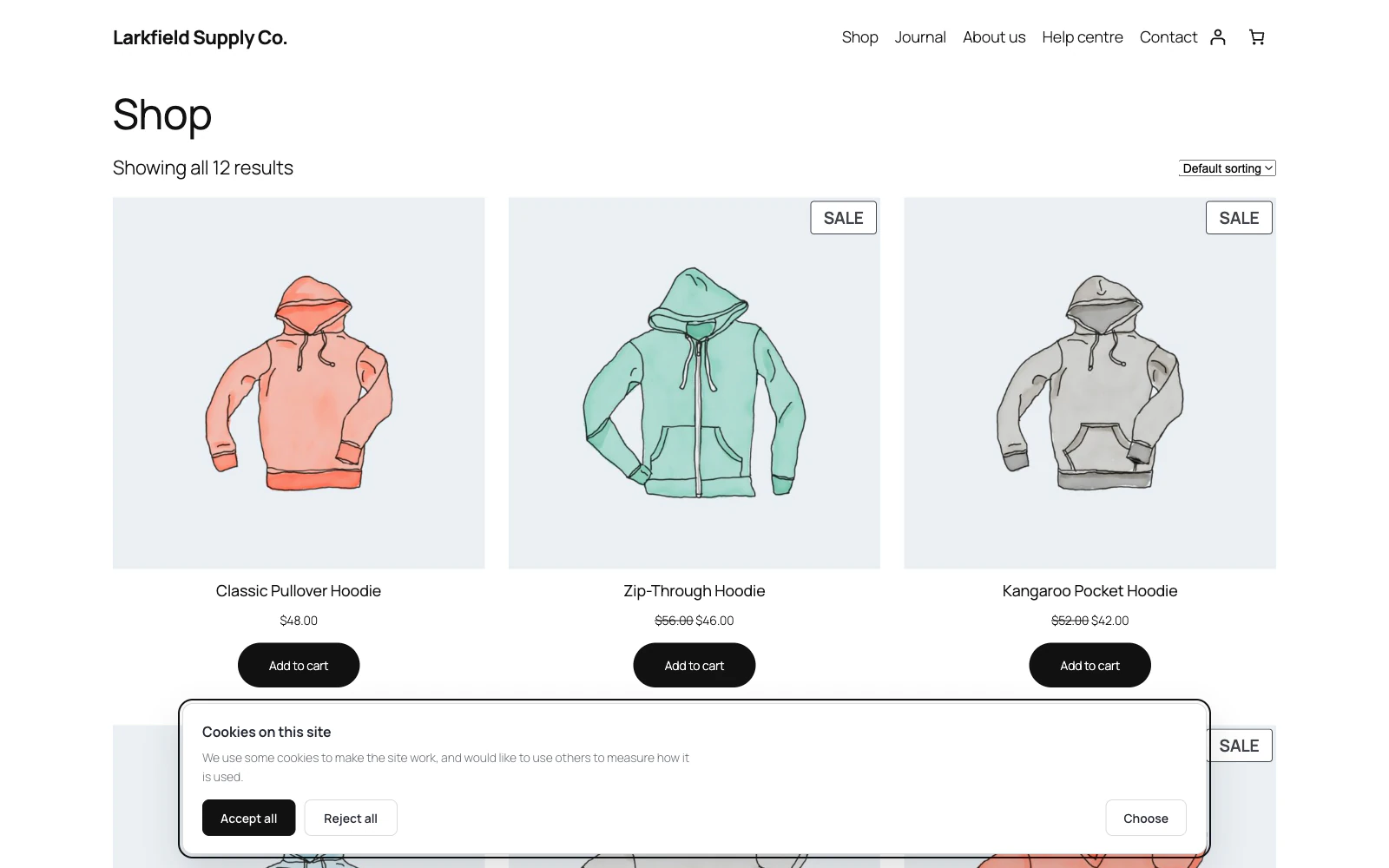
Every script and embed belonging to a service nobody has agreed to is rewritten so the browser will not run it and will not even fetch it, whatever JavaScript type an old snippet was written with.
More: The scripts really are held back
The page that leaves the server has them switched off for everybody; the browser puts back what this visitor agreed to. That order is what makes it work behind a cache, and it is what most consent banners do not do at all.
-
It reads your own site and tells you what is on it
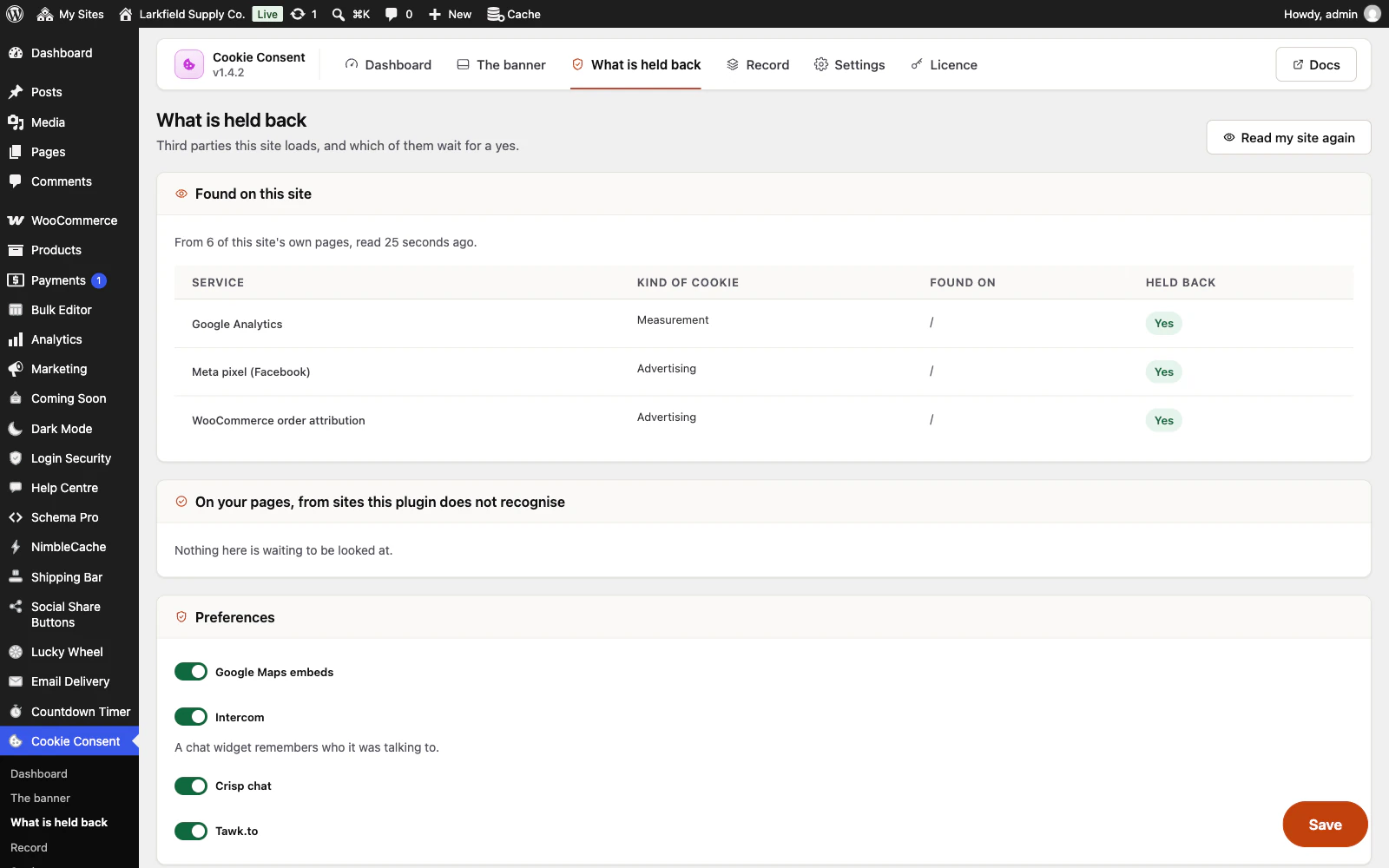
Your own pages, fetched as a logged-out visitor sees them (on a shop, the newest product, the cart and the checkout too, where shop pixels live), and a list of the third parties actually on them, with a switch beside each and a note saying which are not being held back yet.
More: It reads your own site and tells you what is on it
On a slow site it stops after 45 seconds and says how many pages it did not read, rather than running on until something gives up. Nobody knows off the top of their head which of their plugins loads a pixel; this is how you find out rather than guess.
-
Lists scripts from sites it does not know
Reading your site also lists every other site that the pages it reads load a script or an embed from, with the page it was on, including the address a snippet pasted into a page loads.
More: Lists scripts from sites it does not know
Hold each one back until visitors agree to a kind of cookie, or leave it loading. Holding back a host holds back the script or the snippet the row was found in. Nothing is chosen for you, payment and spam-check scripts are marked as usually needed, and the dashboard does not say nothing is getting past until each one found has been looked at. A script that another script adds later without writing its address on the page, such as a tag from Google Tag Manager, is not listed.
-
Knows thirty services by name
Google Analytics and Tag Manager, Meta's pixel, TikTok, LinkedIn, X, Pinterest, HubSpot, Microsoft Advertising, Reddit, Snapchat, Quora, Criteo, Taboola, Outbrain, Klaviyo, WooCommerce order attribution, Hotjar, Clarity, Matomo, Yandex, YouTube and Vimeo embeds, Google Maps, Intercom, Crisp, Tawk.
More: Knows thirty services by name
Recognised by address and by the snippet's own contents, because half of them arrive inline. Anything else takes one line to add.
-
Reads your site again every month
Once a month it reads your pages again, and on the day after an update that teaches it to look for more.
More: Reads your site again every month
When something new has turned up, the Dashboard says what it found, with one button that adds it to the banner and the cookie list. It never changes the banner by itself: until you say so, a service it recognises, of a kind the banner does not ask about yet, is held back for everybody.
-
Embeds are held back as a picture with a button
A YouTube video on a page is a visit to YouTube.
More: Embeds are held back as a picture with a button
Held-back embeds keep the space they were holding and offer a button, so the article does not jump when one loads — and loading one video is about that video, not consent to everything of its kind for ever.
-
Tells Google's own tags what they may do
Consent Mode signals, printed before any Google tag can run, and updated the moment somebody answers.
More: Tells Google's own tags what they may do
Belt as well as braces: the blocker stops the tag loading, and this covers a Google tag you have deliberately let through.
-
Tells Microsoft's tags what they may do
Microsoft Advertising's UET tag and Clarity hear each answer in the form Microsoft asks for: UET's consent mode, denied until somebody agrees, and Clarity's consent API, for advertising and for measurement.
More: Tells Microsoft's tags what they may do
Only on pages that carry them, on every page, and again whenever the answer changes.
Asking properly
9 features
-
Accept and Reject are the same size
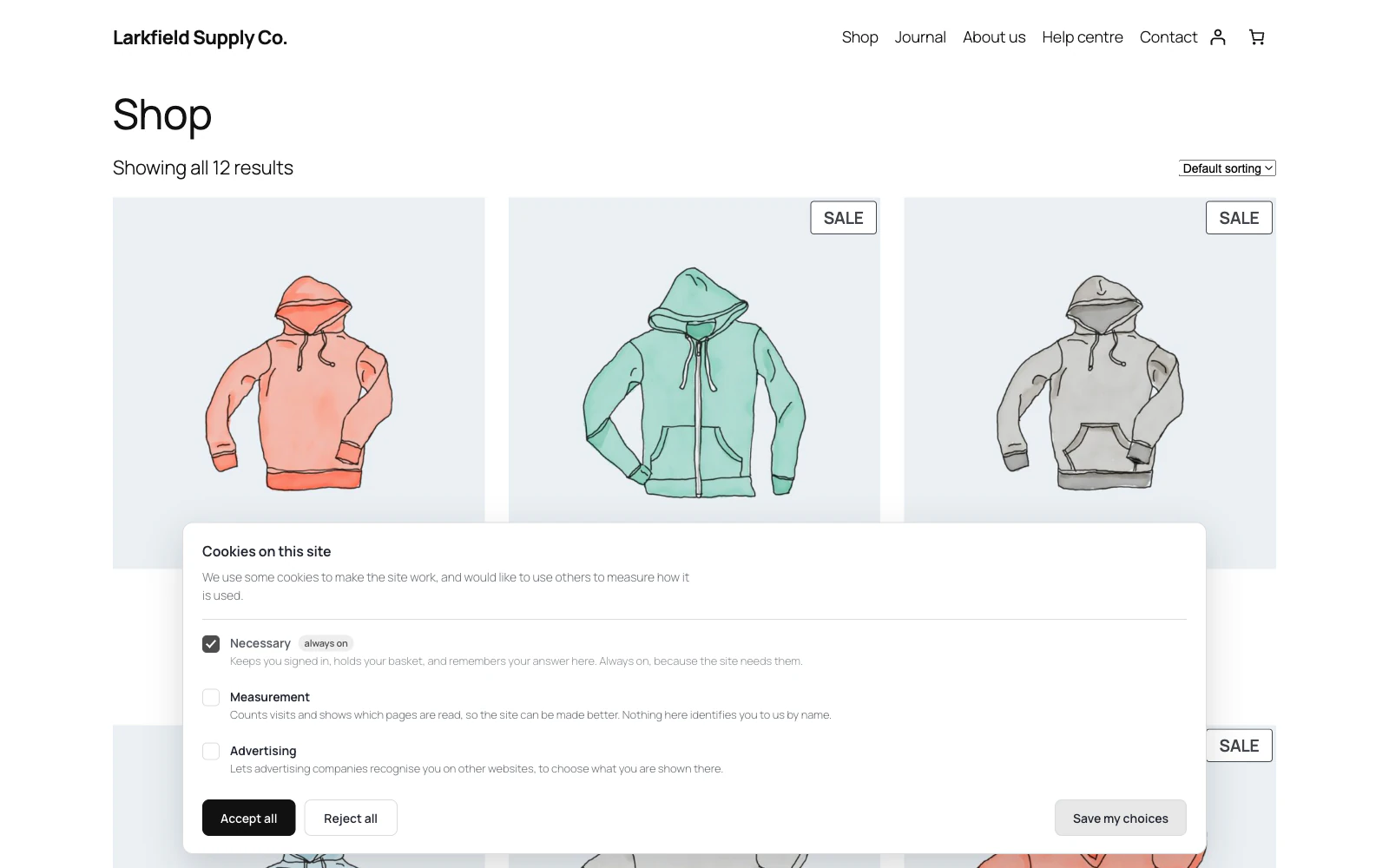
Same row, same weight, one click each, in every design.
More: Accept and Reject are the same size
It is not adjustable, because nearly every enforcement action taken over a cookie banner anywhere has been about exactly this — and a plugin that made it a setting would be selling you a way to get fined.
-
Nothing is pre-ticked, and a scroll is not a yes
The category boxes start empty.
More: Nothing is pre-ticked, and a scroll is not a yes
Scrolling is not treated as agreement and the setting for it is off. A browser sending Global Privacy Control or Do Not Track has already answered, so it is not asked again and the refusal is what gets stored.
-
Asks again when there is something new to ask
A returning visitor is asked again when the banner starts asking about a kind of cookie it did not ask about before, with their earlier choices still ticked and the new kind marked New.
More: Asks again when there is something new to ask
An update asks nobody again, except once on a network of sites in sub-directories, where each site now keeps its own answer. And an Ask everybody again button, for when you change what you do with visitors' data, which does nothing until you confirm.
-
Six shapes, and your colours
A bar, a box in the corner, a middle-of-the-screen panel, a slim one line, a side panel with the categories already open, or a plain one with no card at all.
More: Six shapes, and your colours
None is ever taller than the screen: on a small phone the choices scroll, every answer stays in view, and a choice reached with the keyboard is scrolled into view above them. Three colours, and the quieter greys are worked out from them — so a dark background gives a dark banner without three more fields.
-
A browser's own no is an answer, and it says so
A browser sending Global Privacy Control or Do Not Track is not shown the banner: its refusal is stored and nothing optional runs.
More: A browser's own no is an answer, and it says so
If that visitor opens the choices, one line says their browser's privacy signal was honoured, so they can see it was.
-
Every word on the banner can be yours
The buttons, the names and lines of the kinds of cookie and the tags beside them, the Cookie choices button, the privacy policy link and a held-back video's words each have a box, empty until you type in it, with the plugin's own words shown in grey.
More: Every word on the banner can be yours
With WPML or Polylang each box can be translated into every language you run, and the Dashboard tells you when a language's buttons would otherwise be in English, or when its pages show your words untranslated. Accept and Reject stay the same size whatever you type.
-
A cookie list that keeps itself right
Put [cookie_list] on your policy page and it lists each kind of cookie, the services behind it, who runs them and a link to their privacy policy, plus the site's own cookies and how long they last.
More: A cookie list that keeps itself right
It is built from what the banner asks about, so when a new plugin adds a pixel the list follows at the next reading of the site.
-
A way back to the choices
A small Cookie choices button in a bottom corner of every page, once a visitor has answered, opens the choices with their answer ticked.
More: A way back to the choices
It moves over for the range's other floating buttons instead of covering them, and shows only its drawing on a narrow phone. Or [cookie_choices] anywhere, or any element with the class trcc-open. Somebody who said no in January has to be able to say yes in March, and a consent tool with no way back is one that takes an answer and then refuses to hear a different one.
-
Taking an answer back takes its cookies too
A visitor who agreed to Measurement and switches it off later has Google Analytics' _ga and _gid removed from your site, and the same for each service the reading found under the kinds they switch off, and the page reloads once so the tags already running stop.
More: Taking an answer back takes its cookies too
Each service's cookie names come from its maker's own documentation, and the cookie list shows them. What no website can touch, a company's cookies on its own address, is left to the visitor's browser, and the list says so.
How it works
4 features
-
Other plugins follow the same answer
With the free WP Consent API plugin installed, each visitor's answer is handed to WooCommerce, Site Kit and every other plugin that reads it, in the visitor's own browser, and an answer that has run out is not read as a yes.
More: Other plugins follow the same answer
WooCommerce's order attribution waits for Advertising, so orders from visitors who refuse show the origin Unknown.
-
Google Tag Manager hears each answer
Each answer is one trcc_consent event in the data layer, saying which kinds of cookie were agreed to, so the tags inside your container can wait for their own kind.
More: Google Tag Manager hears each answer
Where a reading finds Google Tag Manager, the Dashboard says what holds the container back and shows the two ways to make advertising tags wait for Advertising. It works behind a page cache, because the event is worked out in the visitor's browser.
-
Works from the command line
wp cookie-consent scan, status and export.
More: Works from the command line
"What does this site load" is a question an agency asks about forty sites at once, and clicking through forty dashboards is how it stops being asked.
-
Multisite, every language, and your privacy policy
Network activation sets up every site, including ones added later, and each site keeps its own visitors' answers, on a network of sub-directories too.
More: Multisite, every language, and your privacy policy
Spanish and French are included and complete, and in any other language you can type every word on the banner and its choices. It declares its own cookie and its own record to WordPress's privacy policy tool, which a consent plugin not doing would be a joke somebody eventually notices.
Showing you asked
1 feature
-
Proof, without keeping anything about anybody
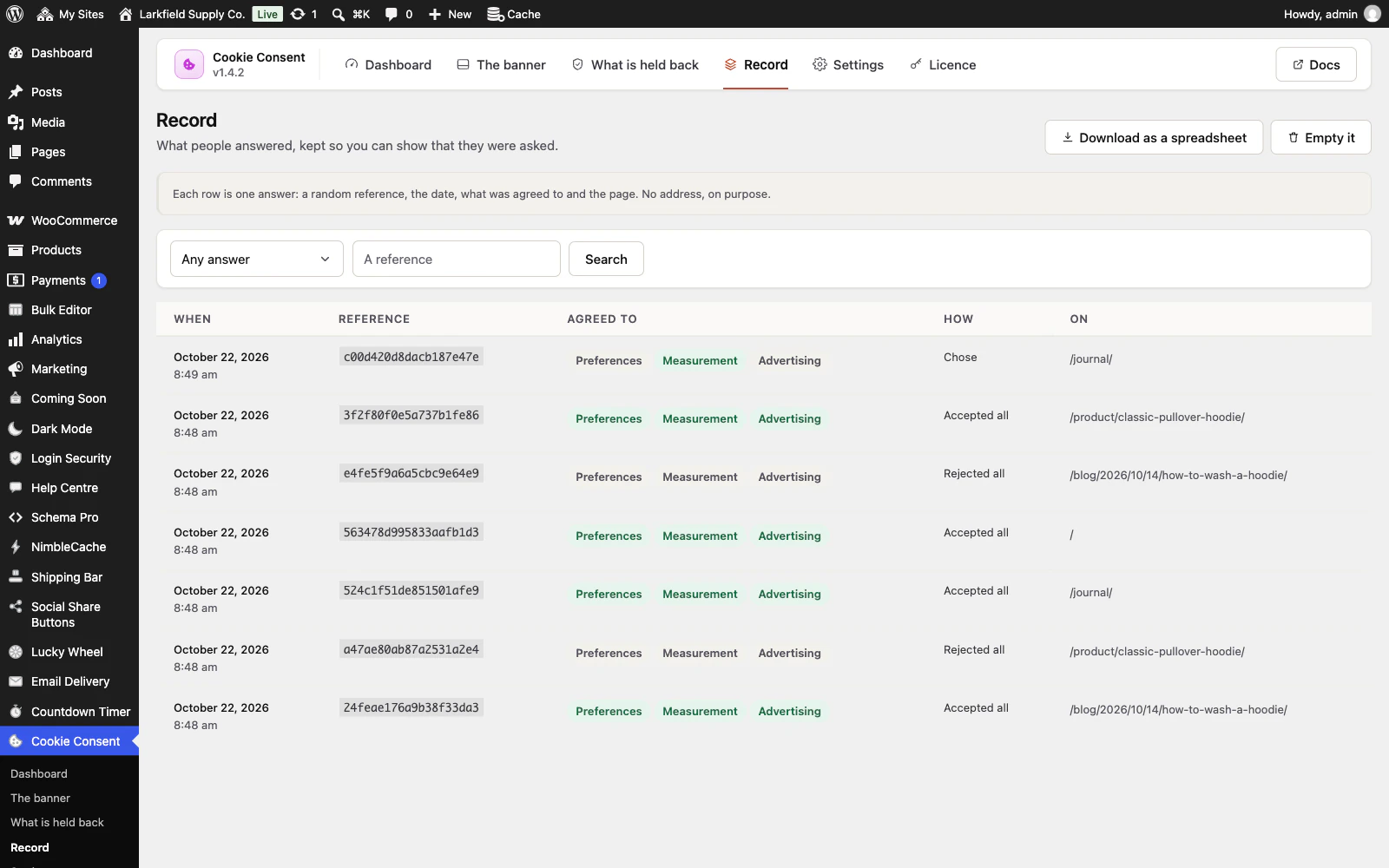
A random reference the visitor's own browser also holds, the date, what was agreed to, and which page they were on.
More: Proof, without keeping anything about anybody
No IP address and no browser string. Handed a reference, you can answer "what did I agree to"; handed the whole table, nobody learns who visited. Downloads as a spreadsheet.
How it asks
1 feature
-
Asked only where the law asks, if you like
Everyone by default.
More: Asked only where the law asks, if you like
Or only where a banner is the law — the EU, the EEA, the UK, Switzerland and Brazil — or only in the countries you list. Where a visitor is comes from Cloudflare or from WooCommerce's own geolocation, and anyone who cannot be placed is asked, because the safe mistake is a banner nobody needed. It works behind a cache: the banner asks a tiny, never-cached question of your own site before it shows.
Pricing
Every plan includes every feature. Choose how many domains, and whether to pay yearly or once.
Pay yearly renews until you cancel
Pay once (lifetime) no renewals
- Every plan includes every feature. You choose only the number of domains.
- 30-day refund, no reason needed. Refund policy
- Licence key and download straight after payment, by Stripe.
- A lapsed licence stops updates and support. It never switches a feature off.
- Local, development and staging copies are free and do not count against your domains.
- Yearly plans renew at the then-current price until you cancel. Cancel any time from your account.
- Where tax applies it is calculated at checkout and shown before you pay.