


Email Delivery features
Every feature, grouped by what it does. All 21 are in every plan.
$19 a year for one site · or pay once from $49
See the plansGetting it arriving
7 features
![The Send a test screen of Email Delivery in WordPress admin. A red box reads It did not go. SMTP Error: Could not authenticate. Below, a panel headed What the mail server said, noting it is safe to paste into a support request, shows the full conversation with smtp.sendgrid.net, the sign-in lines replaced by [credentials hidden], ending in 535 Authentication failed: The provided authorization grant is invalid, expired, or revoked.](https://www.traslatability.com/wp-content/themes/traslatability/assets/screens/email-delivery-by-traslatability/01-test-transcript.webp?ver=1792684944)
-
Send through a real mail service
Gmail, Microsoft 365, SendGrid, Mailgun, Postmark, Brevo, Mailjet, SMTP2GO, Amazon SES, Zoho, Fastmail, or any mail server of your own.
More: Send through a real mail service
Pick the service and the host, port and encryption are filled in, along with a line telling you what its username and password actually are — which for half of them is not the thing you sign in with, and is where most people come unstuck. A site signing in to Microsoft 365 with a password is warned on its Dashboard that Microsoft switches that sign-in off by default at the end of December 2026, with a link to Microsoft's own announcement.
-
A test that tells you what is wrong
Send one message to an address you can check, and read the whole conversation with the mail server.
More: A test that tells you what is wrong
Not "failed" — the actual sentence it said, whether that is a sender address nobody verified, a password the service refused, or a connection your host is blocking. The username and password are taken out of it, so you can paste it into a support thread.
-
Copies of your site never email your customers
A staging or local copy keeps the live site's mail settings, so it sends real order emails and password resets to real customers.
More: Copies of your site never email your customers
Here a copy of the site, or a site WordPress calls staging, holds every message in the log instead and sends nothing. When a real move to a new domain is the reason, one press on the notice sends what was held, oldest first.
-
A backup connection, tried at once
When your mail service refuses a message (a changed password, a spent allowance, an afternoon's outage), a second account or the web server is tried for the same message straight away, so the customer still gets their receipt.
More: A backup connection, tried at once
The log says the backup sent it and what the main one said, and a test checks each connection on its own.
-
Checks the domain you send from
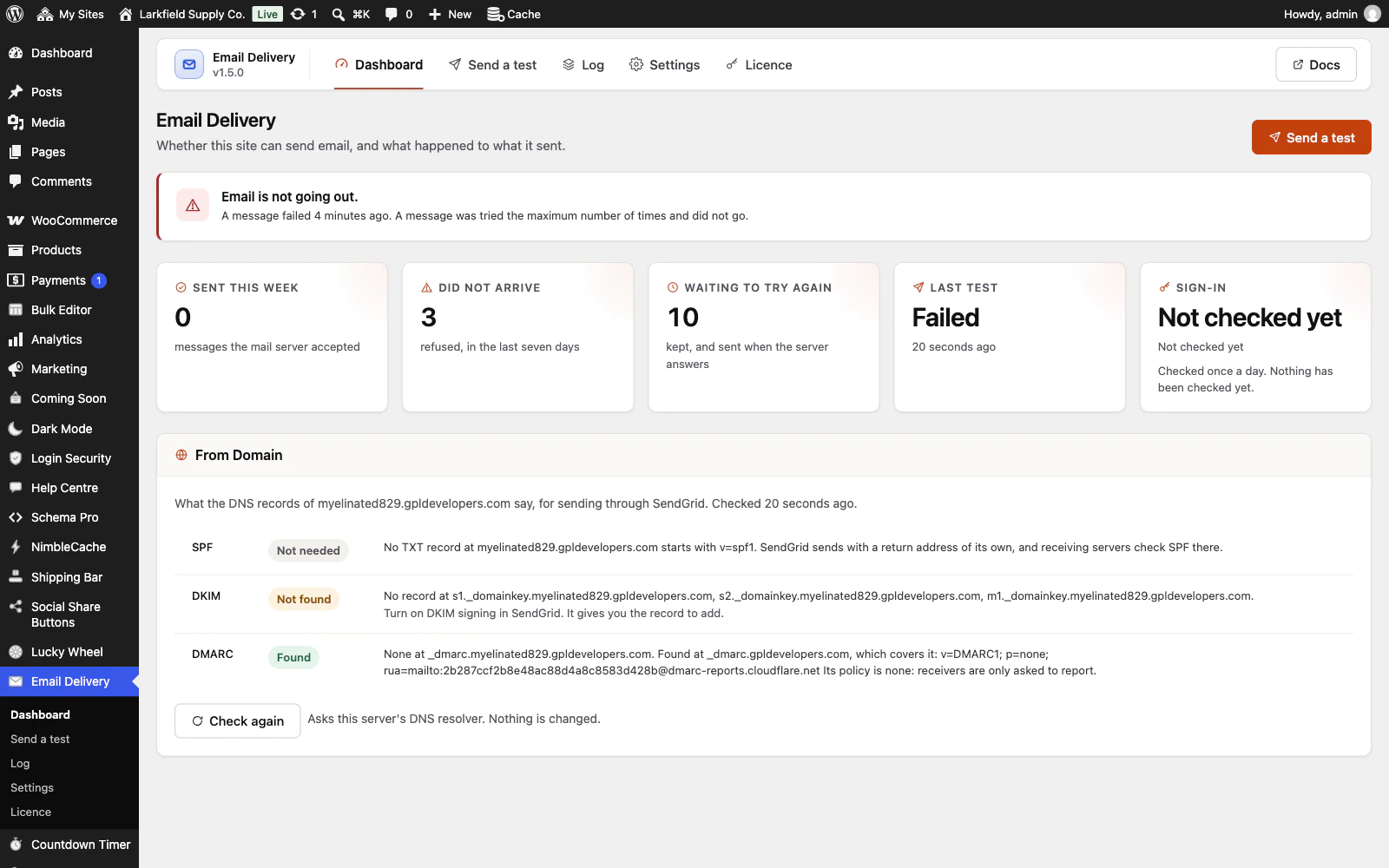
The Dashboard looks up the SPF and DMARC records of your From domain, and DKIM for services that use a fixed record name, and says in plain words what is missing or wrong for the mail service you use: the include Google or Microsoft 365 asks for, two SPF records where there should be one, an SPF record past the 10-lookup limit, an include that leads nowhere or back to itself, a stray part receiving servers cannot read, no DMARC record.
More: Checks the domain you send from
It shows what it looked up and what came back, asks your own server's DNS and no outside service, and runs daily, after a test and when you press Check again.
-
The password is not sitting in plain text
It is sealed with a key made from your wp-config.php salts, which do not live in the database.
More: The password is not sitting in plain text
So a database dump on its own — the thing that gets shared with a developer, restored onto staging, or left in a backup bucket — is no longer a mailbox somebody else can send from. Against somebody holding both the files and the database it does nothing, and the screen says so rather than implying more.
-
Set the From address once
With none set, WordPress sends as wordpress@yourdomain, which is usually not a real mailbox and which most mail services refuse outright.
More: Set the From address once
Choose the address and the name your customers should see, and optionally make every plugin on the site use it — including the ones that insist on their own.
Knowing what happened
8 features
-
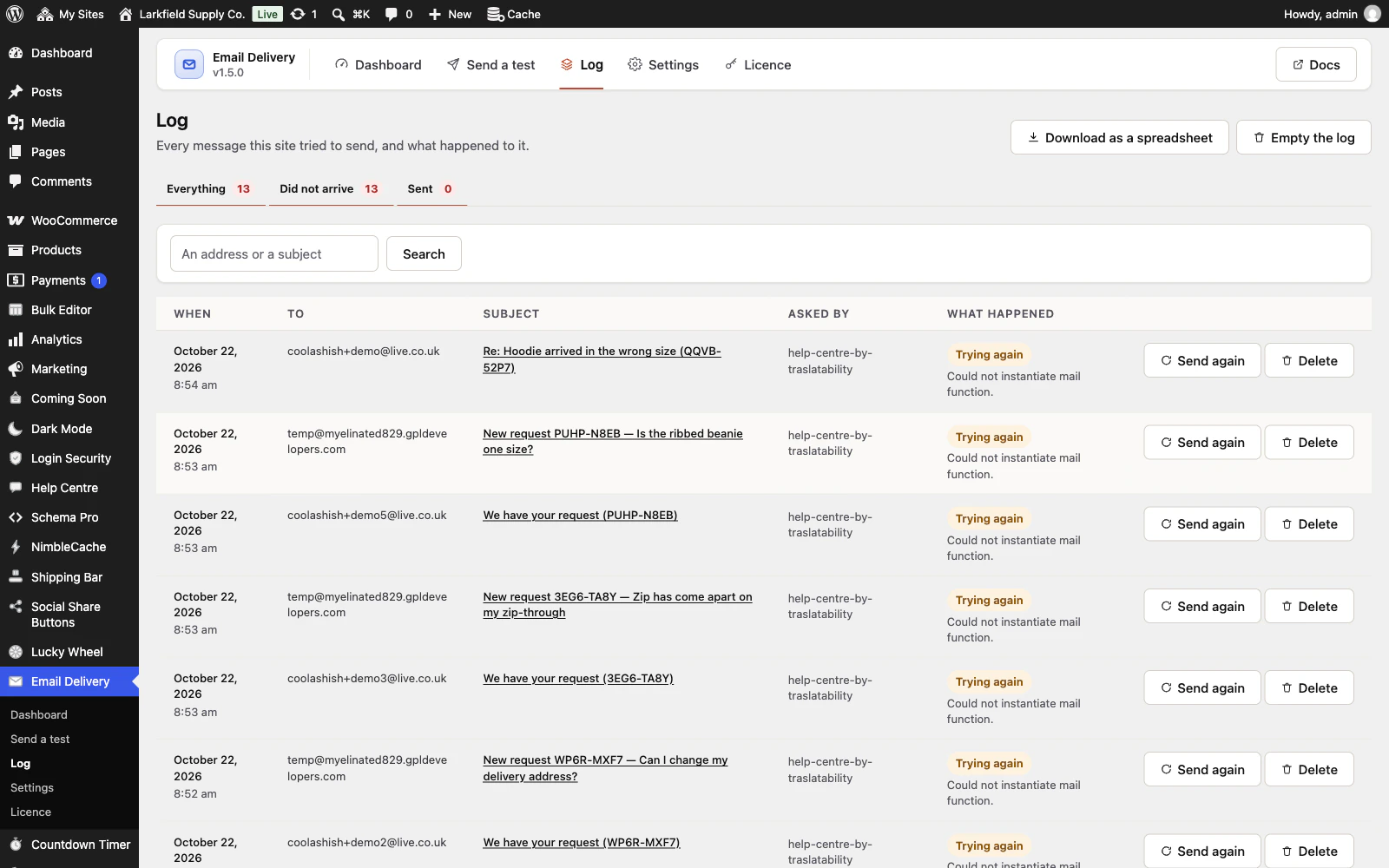
Every message, and what happened to it
Who it went to, what it was called, which plugin asked for it (WooCommerce, a contact form, WordPress itself), when, and whether the mail server accepted it.
More: Every message, and what happened to it
Searchable by address or subject, with a tab for the ones that did not arrive. When somebody says they never got their receipt, that stops being a guess.
-
A refused message is kept and tried again
A busy mail server or a rate limit makes WordPress throw a message away exactly as if the password were wrong.
More: A refused message is kept and tried again
Here it is held and sent again on a widening gap, a few times, and then given up on visibly rather than quietly. For a password reset that is a convenience; for an order confirmation it is a customer who does not think the shop vanished.
-
You are told the day it breaks
A notice in wp-admin, on every screen, until somebody has looked — and an email as well, at most once a day.
More: You are told the day it breaks
The notice comes first on purpose: a plugin that only emails you when email is broken is a smoke alarm wired to the fuse that just blew.
-
Alerts in Slack, Discord or anywhere
The same alert can also be posted to a Slack or Discord channel, or as JSON to a public https address of your own, straight from your own server, so you hear about it even when email itself has stopped.
More: Alerts in Slack, Discord or anywhere
At most once a day, with a test button. The address a failed message was for is left out unless you switch it on, and the webhook address is stored scrambled and kept out of an exported settings file.
-
Open any message, and send it again
Click a message in the log to see who it went to, any Cc and Bcc, which plugin sent it, which connection took it and what the mail server said.
More: Open any message, and send it again
Switch on keeping the message itself and it is shown too, with nothing in it allowed to run or load from outside, and you can send it again to the same address or the one the customer meant, with the log linking the copy to the original. A password reset or new-account email from WordPress or WooCommerce only goes back to its own address, and the key in its link is hidden on the page.
-
An order's emails, on the order screen
With WooCommerce, each order's screen lists the emails WooCommerce sent about it: New order, Processing order, Completed order and the rest, whether each was for the customer or the shop, who it went to, when, and what the mail server said.
More: An order's emails, on the order screen
Send it again sends one of them once more, the way WooCommerce's own order actions do, to the address on the order or, for the shop's own emails, to the recipients in WooCommerce's settings, and a waiting copy of a refused one is taken off the retry queue so it arrives once. In the log, each of those emails links to its order.
-
The sign-in is checked every day
Once a day the plugin signs in to your mail service and straight out again, sending nothing.
More: The sign-in is checked every day
A revoked app password or a deleted API key is usually found at the next check, with the server's own reply on a wp-admin notice, rather than when a customer's receipt goes missing. Two refusals in a row, ten minutes apart, before it says anything. A mail server that offers no sign-in, or cannot be reached at all, is reported as that, so nobody changes a password that was right. On for new installs, and one click on the Dashboard for sites that had the plugin before.
-
Fewer routine emails from WordPress
Switch off the emails WordPress sends about automatic updates that worked, and the administrator's copy of every new account and password reset.
More: Fewer routine emails from WordPress
A failed update is still emailed, and the emails telling somebody their own password or address changed always go.
How it works
6 features
-
Set the connection in wp-config.php
Define the mail server, port, encryption, username, password and From address as constants in wp-config.php, and every site that uses the file sends that way, with the password never stored in the database.
More: Set the connection in wp-config.php
The Settings screen shows those fields greyed and says where they come from. On a network a must-use plugin can give one site its own.
-
Nothing replaces how WordPress sends
Every plugin on the site keeps calling the same wp_mail() it always called.
More: Nothing replaces how WordPress sends
This configures the mailer that function already uses and listens for what it says afterwards. There is no second code path to go wrong, which is what makes it safe to put on a shop that is taking orders — and switching it off puts the site back exactly where it was.
-
The message itself is not kept
A body is a password reset link, an order, a customer's question.
More: The message itself is not kept
None is stored unless you ask for it. The one exception is a message waiting to be sent again, because you cannot re-send what you did not keep, and that copy is deleted the moment it goes or is given up on.
-
Works from the command line
wp email-delivery test, check, status, log and retry.
More: Works from the command line
A site whose email has stopped is often a site where something larger has gone wrong, and the first thing anybody does is open a terminal.
-
Multisite, and every language
Network activation sets up every site, and a site added later is set up when it is created.
More: Multisite, and every language
Spanish and French are included and complete, and every string is translatable.
-
Tells your privacy policy what it keeps
A log of sent email holds the address of everybody the site has written to, which is personal data.
More: Tells your privacy policy what it keeps
WordPress has a place for a plugin to declare that, and this one uses it — so the suggested wording is there for you rather than something you have to work out.
Pricing
Every plan includes every feature. Choose how many domains, and whether to pay yearly or once.
Pay yearly renews until you cancel
Pay once (lifetime) no renewals
- Every plan includes every feature. You choose only the number of domains.
- 30-day refund, no reason needed. Refund policy
- Licence key and download straight after payment, by Stripe.
- A lapsed licence stops updates and support. It never switches a feature off.
- Local, development and staging copies are free and do not count against your domains.
- Yearly plans renew at the then-current price until you cancel. Cancel any time from your account.
- Where tax applies it is calculated at checkout and shown before you pay.