


Coming Soon and Maintenance Mode features
Every feature, grouped by what it does. All 23 are in every plan.
$19 a year for one site · or pay once from $49
See the plansThe basics
5 features
-
Coming soon, or maintenance
Two modes, and the difference is not decoration.
More: Coming soon, or maintenance
Coming soon says your site is not live yet, and the address works like any other page, so you can share it while you build. Maintenance answers 503 with a Retry-After, so a crawler comes back instead of replacing your site with a holding page in its index.
-
Eighteen designs, none of them a template to configure
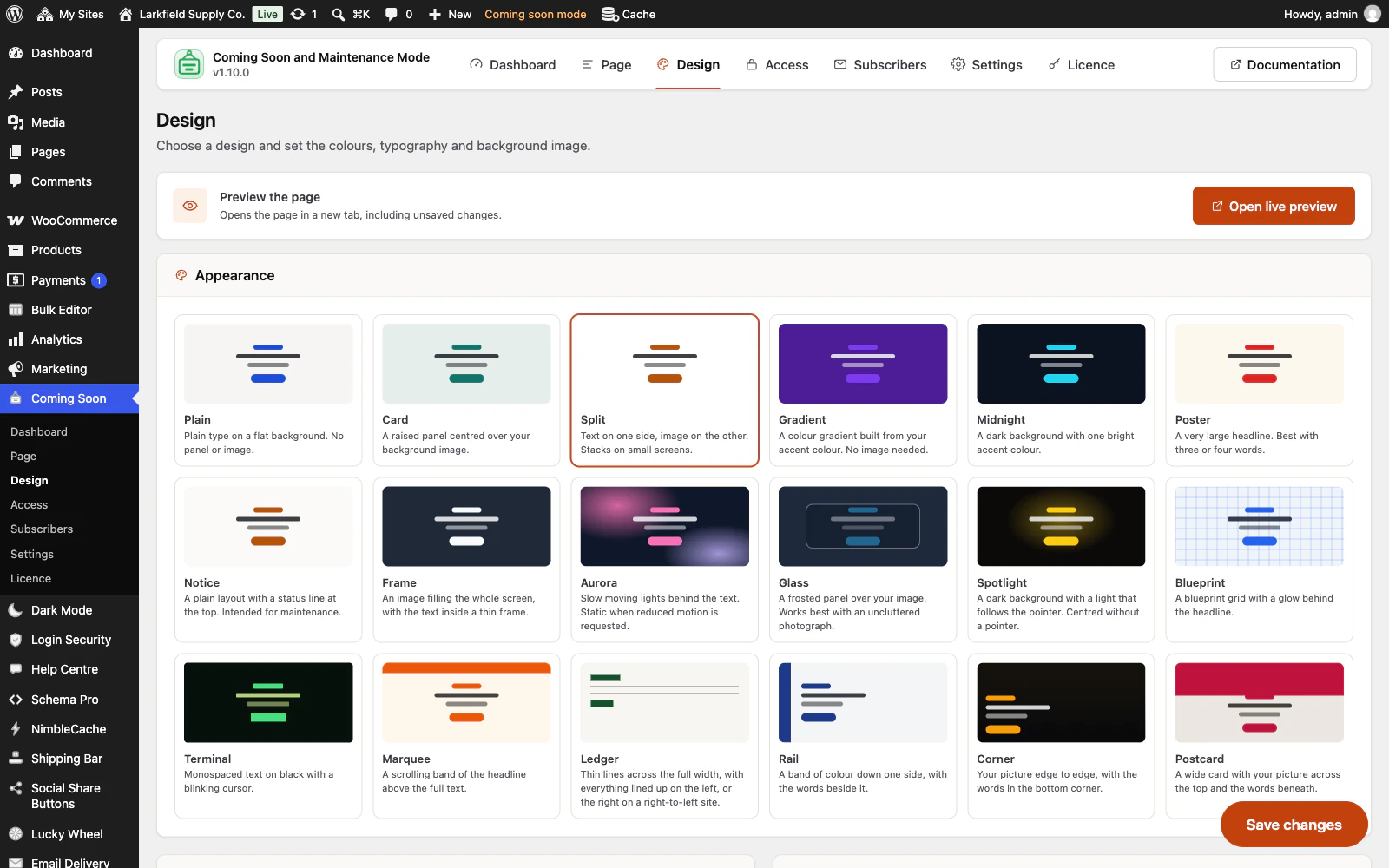
Quiet ones — Plain, Card, Split, Notice — and ones with something going on: Aurora's drifting lights, Glass over your photograph, a Spotlight that follows the pointer, Blueprint paper, a blinking Terminal, a Marquee band.
More: Eighteen designs, none of them a template to configure
Four of them arrange the page rather than colour it: Ledger's full-width thin lines, Rail's band of colour down the edge, Corner's words in the bottom corner of your picture, Postcard's picture across the top of a wide card. Pick one and override any of its four colours. No page builder, no template files, and every bit of motion stops for a reader who has asked for less.
-
A countdown that tells the truth
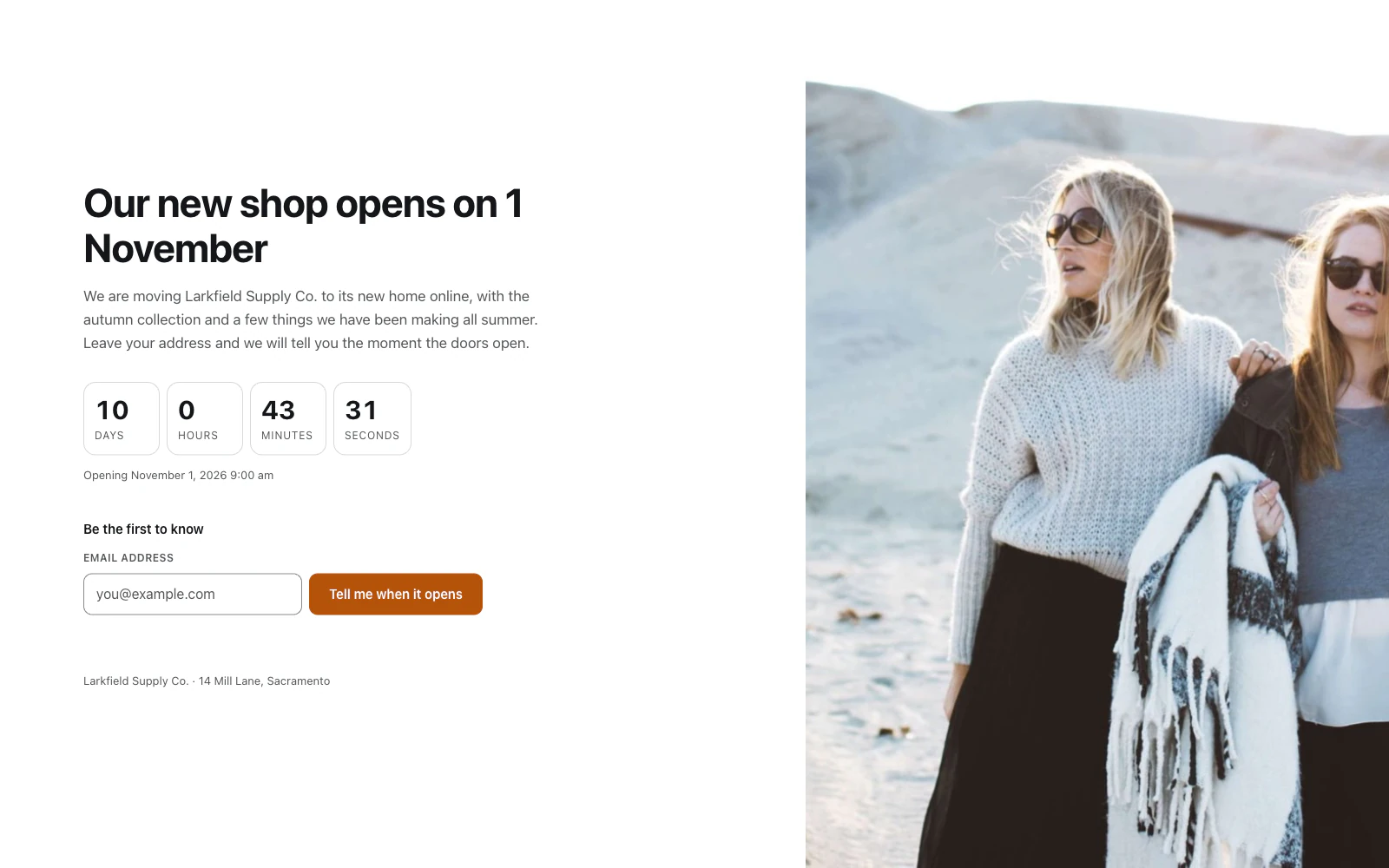
Counts to the opening time you set, in your site's own time zone.
More: A countdown that tells the truth
It is drawn with the right numbers already in it, so it reads correctly before any script runs, and it measures the visitor's clock against your server so a phone that is an hour fast still counts down to the right moment.
-
Your page during WordPress updates, too
While WordPress installs an update it shows every visitor a bare "Briefly unavailable for scheduled maintenance".
More: Your page during WordPress updates, too
Switch one setting on and they see your own design and logo instead, with words of your own and a 503 that tells search engines to come back, even while this plugin is the one being updated. Another plugin's maintenance file is never overwritten, and on a network each site switched on gets its own page.
-
Close the shop for orders, not the site
Away for the holidays?
More: Close the shop for orders, not the site
With WooCommerce, a third mode keeps every page open and indexable and only pauses buying: the Add to cart button goes, carts and the checkout refuse, and a notice says so, with the day you take orders again when you set a switch-off time. Keep gift cards on sale, let chosen roles still buy, or keep taking orders and only tell shoppers when they will be sent out. Nobody on your list is emailed when you reopen.
Your list
3 features
-
Collects addresses, and actually writes to them
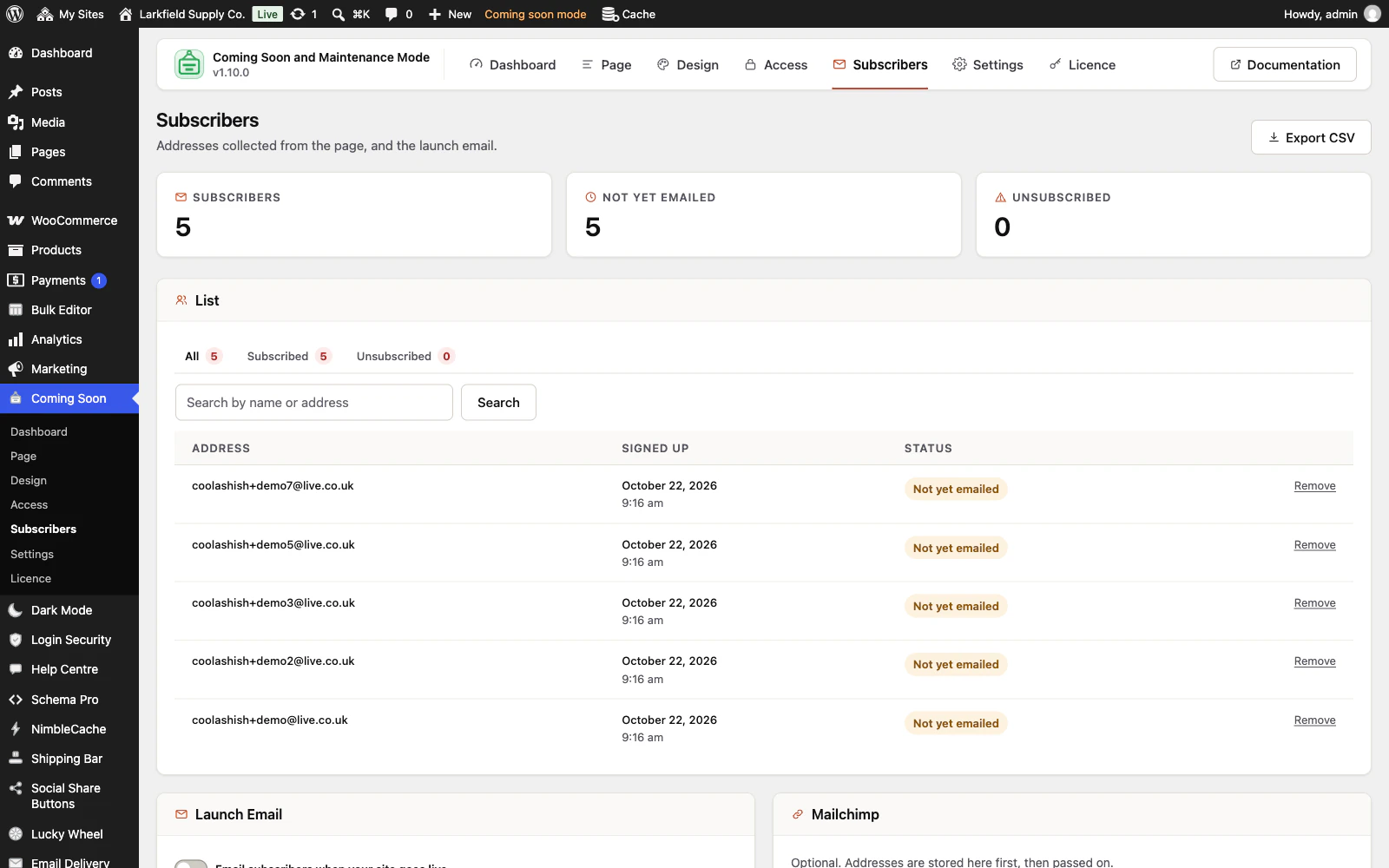
A sign-up form built into the page, with the list kept on your own site.
More: Collects addresses, and actually writes to them
Switch the launch email on, and when you open, the plugin emails everybody who asked (it checks with you first when you open by hand, and when the scheduled opening runs more than a week late): in small batches, plain text, with a one-click unsubscribe, and nobody written to twice. Put the page back up while it is going out and it stops.
-
Mailchimp, one way and best effort
Every address is recorded on your site first and passed to Mailchimp afterwards, so an outage, an expired key or a deleted audience never costs a visitor their place on the list.
-
Only people who confirm get the launch email
Switch it on and a new sign-up waits until the person follows a link your site emails them and presses one button, so mistyped addresses and addresses somebody else typed in never reach your list or Mailchimp.
More: Only people who confirm get the launch email
Only the time they confirmed is kept, nothing about their browser or connection. Addresses nobody confirms are deleted after 30 days, and people already on your list stay on it. The Subscribers screen lists the people still waiting on a tab of their own. Off until you switch it on.
Who gets in
5 features
-
A link for each person you show the site to
An address that lets somebody see the finished site without signing in and without a password, one for each person: the client, the printer, the translator, each named, each with an end date if you want one.
More: A link for each person you show the site to
Remove one and only that person is out. The list shows the day each link was last used, and nothing more about who used it.
-
Cover part of a site, not all of it
Cover the shop while the blog carries on, or leave one contact page open while everything else waits.
More: Cover part of a site, not all of it
The same tick lists, searchable fields and address patterns every Traslatability plugin uses to decide where it applies.
-
A password for the people who need one
A discreet box at the foot of the page for a group who share one password.
More: A password for the people who need one
Stored the way WordPress stores yours, five wrong guesses and that visitor waits a quarter of an hour, and changing it signs out everyone using the old one.
-
Roles walk straight past
Choose which roles see the site as normal while everyone else sees the page.
More: Roles walk straight past
Anyone who can change the setting always gets through, so unticking your own role cannot lock you out of your own front end. Switch on the Sign in link and the people you let in can sign in from the page itself and come back to the page they asked for.
-
No sign-ups until you open
The sign-in page stays open while your page is up, and its registration form does not.
More: No sign-ups until you open
WordPress's own form, a network's sign-up page, and WooCommerce's My account and checkout refuse new accounts with one plain sentence, so a site nobody has heard of yet does not collect accounts from bots. Signing in still works, the people you let in can still register, and one switch allows sign-ups if you want them before launch.
The clock
2 features
-
Opens itself, on time
Set a moment to close and a moment to open.
More: Opens itself, on time
Both are compared on every request as well as scheduled, so the site opens on the minute even on a host whose cron has not run for a fortnight.
-
Told when WordPress still asks search engines to stay away
WordPress's own "Discourage search engines from indexing this site" is easy to leave ticked after a launch.
More: Told when WordPress still asks search engines to stay away
Once your site is open, the Dashboard says so while it is, with one button that unticks it and one that keeps it, and names a robots.txt file that asks every search engine to keep away. Nothing is said on a staging or local copy.
Honest by default
2 features
-
Counting without watching anybody
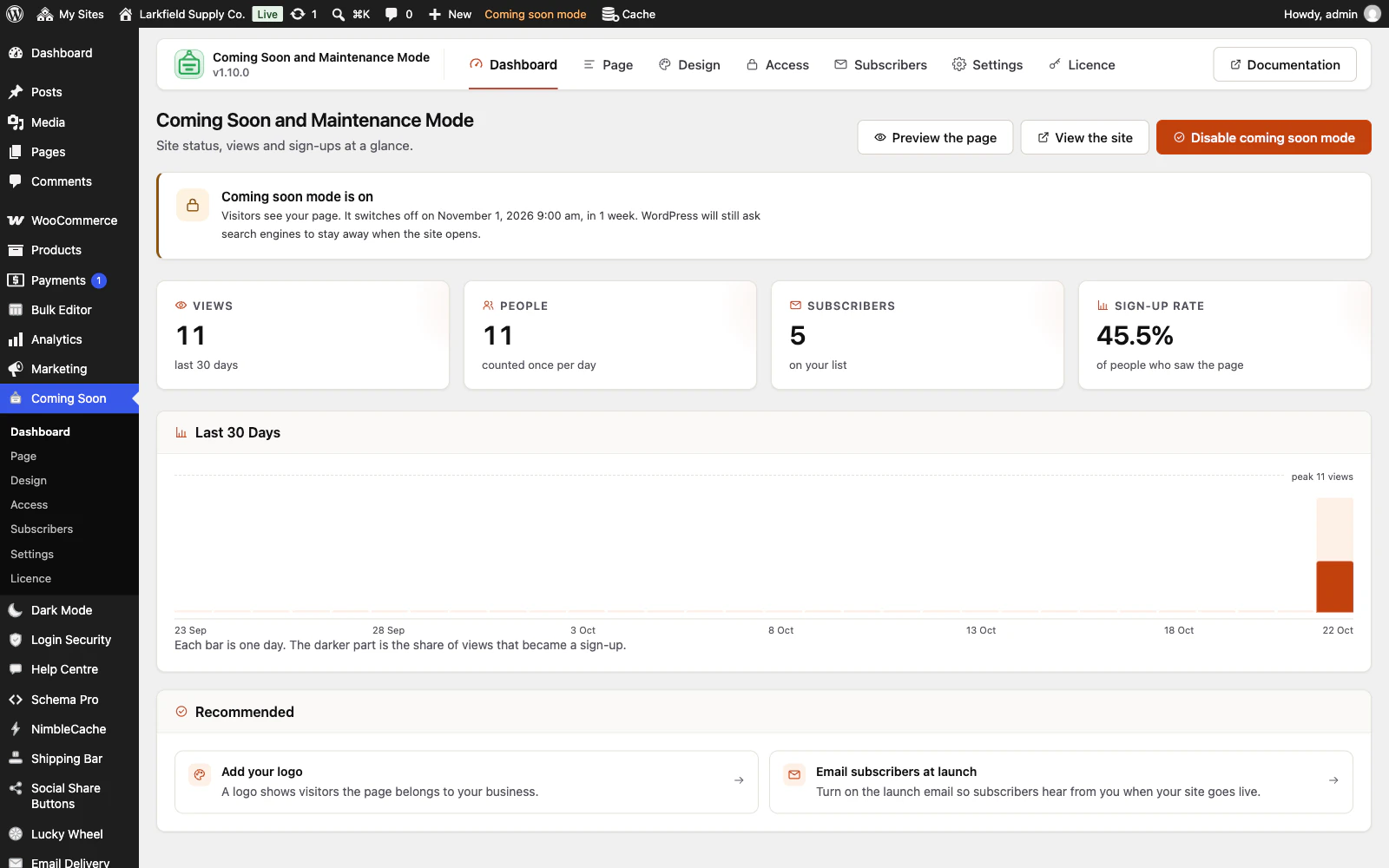
Views, people and sign-ups, one row per day.
More: Counting without watching anybody
No addresses stored, no user agents, no third-party script, and nothing that could identify a single visitor — so there is nothing to add to your privacy notice.
-
One request, nothing fetched
The stylesheet and the script are inside the page, the type is already on the reader's machine and the network marks are drawn rather than loaded.
More: One request, nothing fetched
The page most likely to be opened on a bad connection makes no outside request at all.
Everywhere
6 features
-
Set it up once, not once per site
Export the design, the wording, the launch email and the rules as a small file, and import it on your next site.
More: Set it up once, not once per site
Settings only — no subscribers, no statistics, no licence key. Rules that name a particular page by its number are left for you to set, because that number means something else on the other site, and the message after the import says which ones.
-
Works on a network
Activate it on one site or across a whole multisite network.
More: Works on a network
Each site keeps its own settings, its own list and its own counts, and a site added to the network later is set up on its own.
-
Spanish and French included
Every string in the plugin, the admin screens and the licence page is translated into Spanish and French, and the page itself is built from your words in whatever language you write them.
-
An admin that never reloads
Every screen in the plugin arrives without a page load, and every save happens where you are standing.
More: An admin that never reloads
WordPress fetches the whole of wp-admin's CSS and JavaScript again to change one panel; this fetches the panel. The screen you are on is still there while the next one is on its way, and the one you are heading for is usually already in hand — a pointer takes a moment to reach a menu item, and that moment is spent fetching.
-
Saved, and told so where you are looking
A save answers in the corner of the screen, bordered in the colour of what it is telling you and saying what was saved rather than just "Saved".
More: Saved, and told so where you are looking
Four seconds, and hovering holds it open. No reload, and no scrolling back to find a notice above the header three hundred pixels from the button you just pressed.
-
Tabs that change instantly
A WordPress admin request spends about a second in its own bootstrap before a plugin gets a word in, and fetching when your pointer arrives only buys back a fraction of it.
More: Tabs that change instantly
So the plugin's other screens are fetched quietly while you read the first one — one at a time, only while the browser is idle, and never on a metered connection. By the time you click a tab the answer has been in memory for seconds.
Pricing
Every plan includes every feature. Choose how many domains, and whether to pay yearly or once.
Pay yearly renews until you cancel
Pay once (lifetime) no renewals
- Every plan includes every feature. You choose only the number of domains.
- 30-day refund, no reason needed. Refund policy
- Licence key and download straight after payment, by Stripe.
- A lapsed licence stops updates and support. It never switches a feature off.
- Local, development and staging copies are free and do not count against your domains.
- Yearly plans renew at the then-current price until you cancel. Cancel any time from your account.
- Where tax applies it is calculated at checkout and shown before you pay.