


NimbleCache features
Every feature, grouped by what it does. All 27 are in every plan.
$19 a year for one site · or pay once from $49
See the plansThe engine
5 features
-
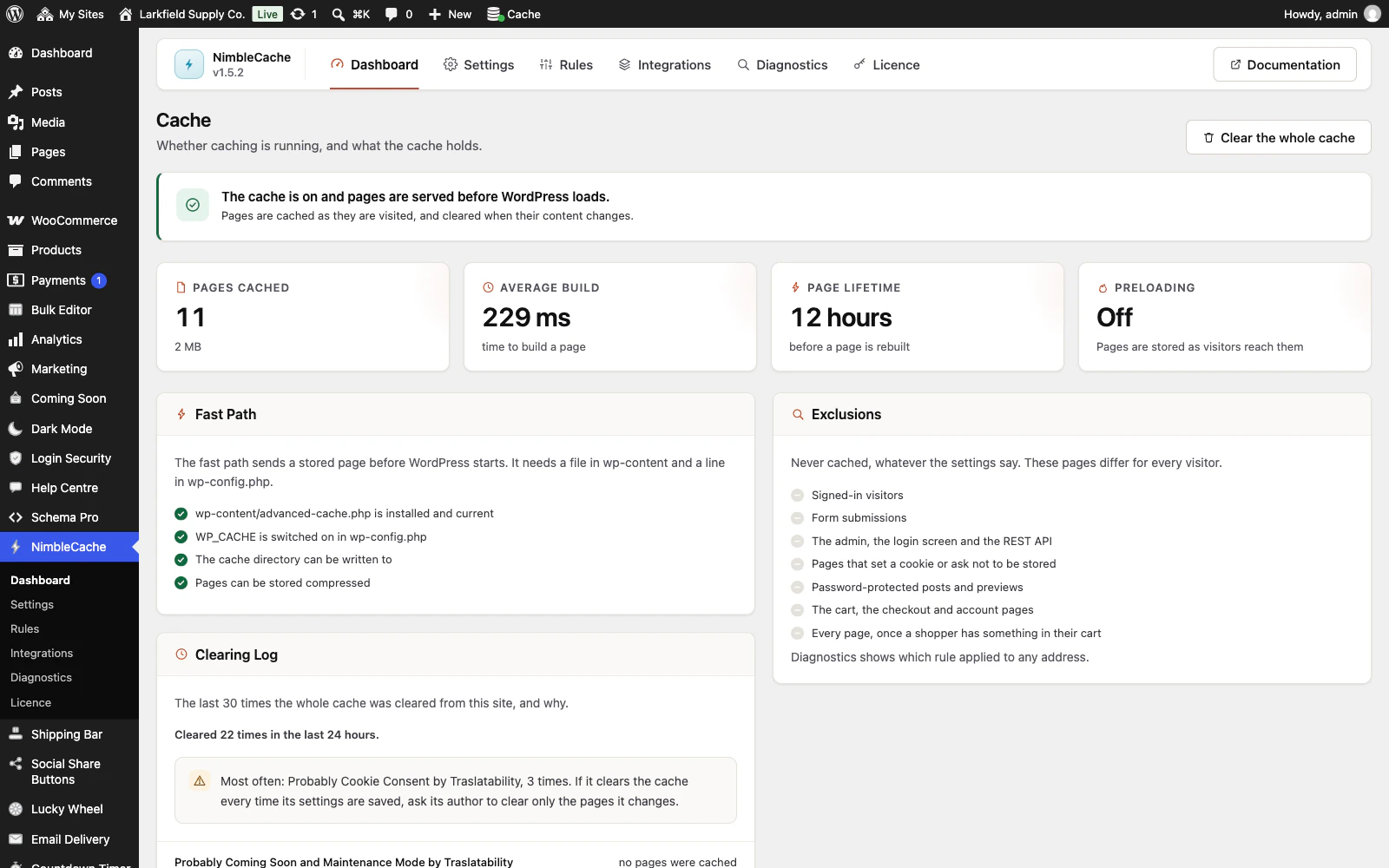
Answers before WordPress loads
A cached page is served from wp-content/advanced-cache.php, which runs before the database connects and before a single plugin is read.
More: Answers before WordPress loads
The whole hit costs one file include, one hash and one file read — not a WordPress bootstrap with the theme skipped.
-
Works on the hosting you already have
The cache is files on disk, which is the one thing every host has.
More: Works on the hosting you already have
There is nothing to install alongside it and no command line to open. The one step that can need a hand is a single line in wp-config.php: the plugin writes it, and if the file is locked it shows you the line to paste.
-
A hundred visitors, one rebuild
When a popular page expires, the first request rebuilds it and everyone else is handed the slightly stale copy rather than joining in.
More: A hundred visitors, one rebuild
Without that, a traffic spike on an expiring page turns into a hundred identical page builds — which is how a busy morning becomes an outage.
-
Compressed once, not on every visit
A gzipped copy is written alongside the page when it is stored, so serving it costs nothing.
More: Compressed once, not on every visit
Compressing on every request would throw away most of what the cache just saved.
-
Answers "have you got this already?"
A returning visitor's browser asks whether its copy is still current on every navigation.
More: Answers "have you got this already?"
This answers properly with a 304 and no body, which saves the whole page transfer — a bigger win than the cache hit itself.
Knowing what it did
4 features
-
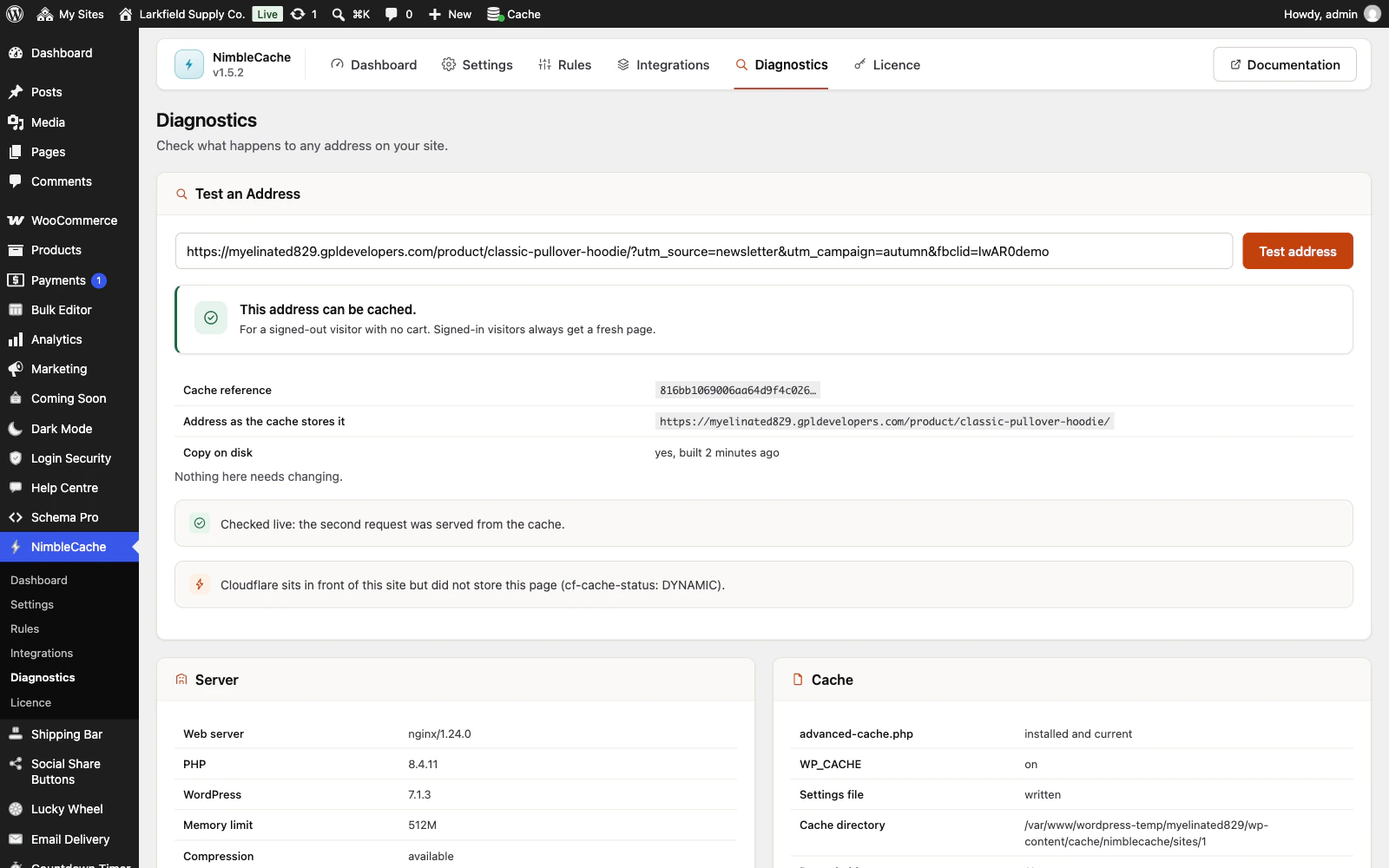
Tells you exactly why a page was not cached
Type an address into Diagnostics and it runs the real decision — the same code the live path runs, not a description of it — names the rule that applied and explains it in a sentence.
More: Tells you exactly why a page was not cached
Then it fetches the page twice and reports what the server actually did.
-
Says why pages were built but not kept
When the Dashboard shows few pages cached, a panel lists why WordPress built pages that the cache then refused, over the last seven days, busiest first.
More: Says why pages were built but not kept
When a plugin's cookie is to blame it names the cookie, in the panel and in the response header, a PHP session's PHPSESSID included, and each line opens Diagnostics on an example page. The counts are samples, at most one a minute, keep no visitor data, and can be cleared once the cause is fixed.
-
Shows what cleared the whole cache, and who
A cache that keeps going cold is nearly always something clearing it.
More: Shows what cleared the whole cache, and who
The Dashboard lists the last 30 times the whole cache was cleared from this site, with the reason (a menu saved, a plugin updated, the Clear button, or the plugin that asked, marked "probably" when that is worked out from where the request came from), who was signed in (someone who works on the site, never a customer) and the pages removed. Past 10 in a day it names the reason seen most and what to do about it.
-
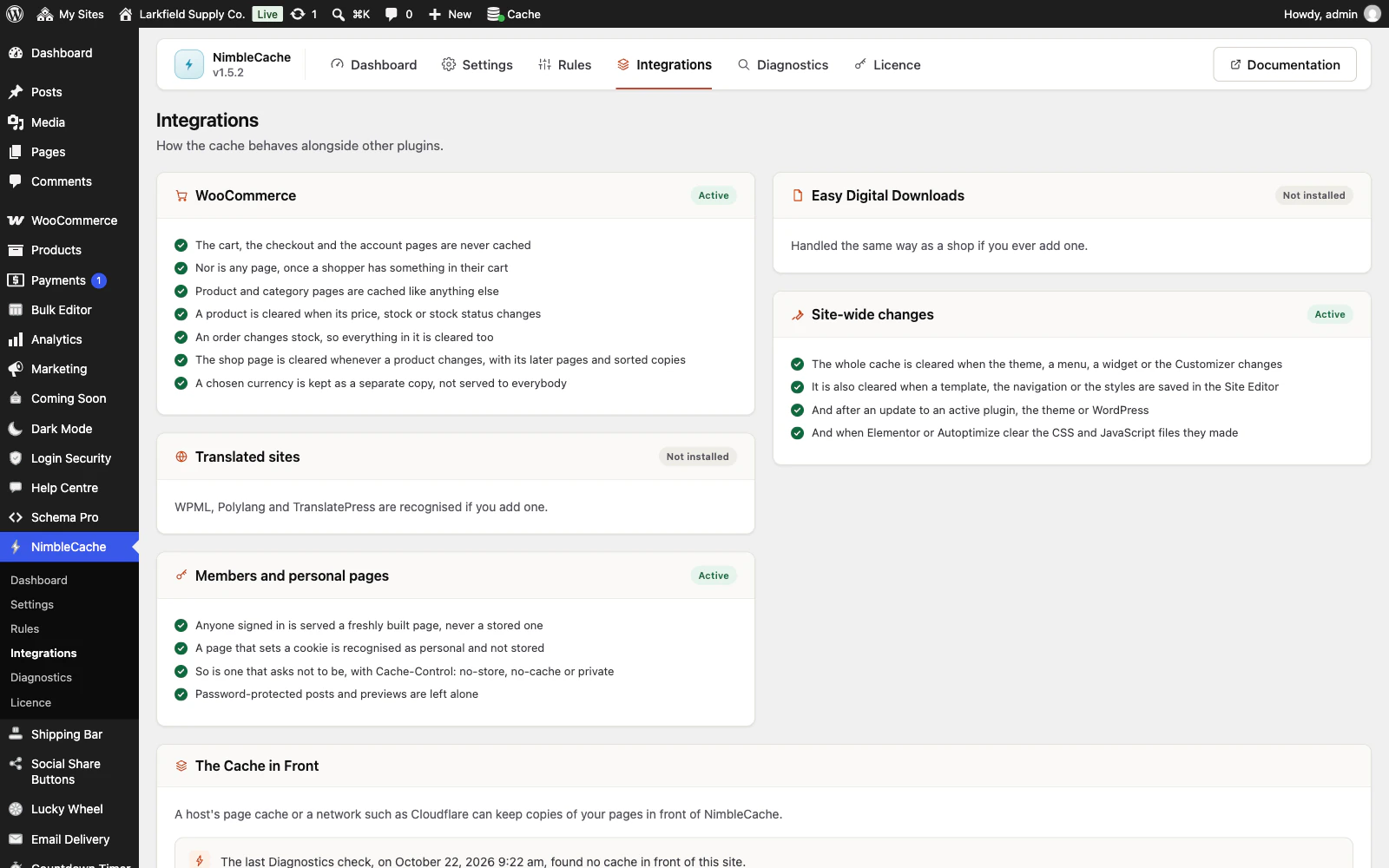
Shows you what it does about your other plugins
An Integrations screen that names what it found — WooCommerce, Easy Digital Downloads, WPML, Polylang, TranslatePress — and lists exactly what it does about each.
More: Shows you what it does about your other plugins
Almost none of it is a setting, because a cart page is not cacheable whatever anybody ticks. It is there so you can see the work rather than take it on trust.
Staying correct
8 features
-
Throws away the page you changed, not the whole cache
Edit a post and it purges that post, the front page, its categories, tags, author page, archives and feeds.
More: Throws away the page you changed, not the whole cache
Not everything. Emptying the lot because one thing changed is why so many sites run a cache that never warms up. A page that lists posts in a way it cannot work out, such as a news page built with a Query Loop, can be added to the pages it clears with them.
-
A shop that stays correct
The cart, checkout and account pages are never cached.
More: A shop that stays correct
Anyone with something in their cart stops getting cached pages entirely. Price and stock changes purge the product, its category and the shop page the moment WooCommerce reports them.
-
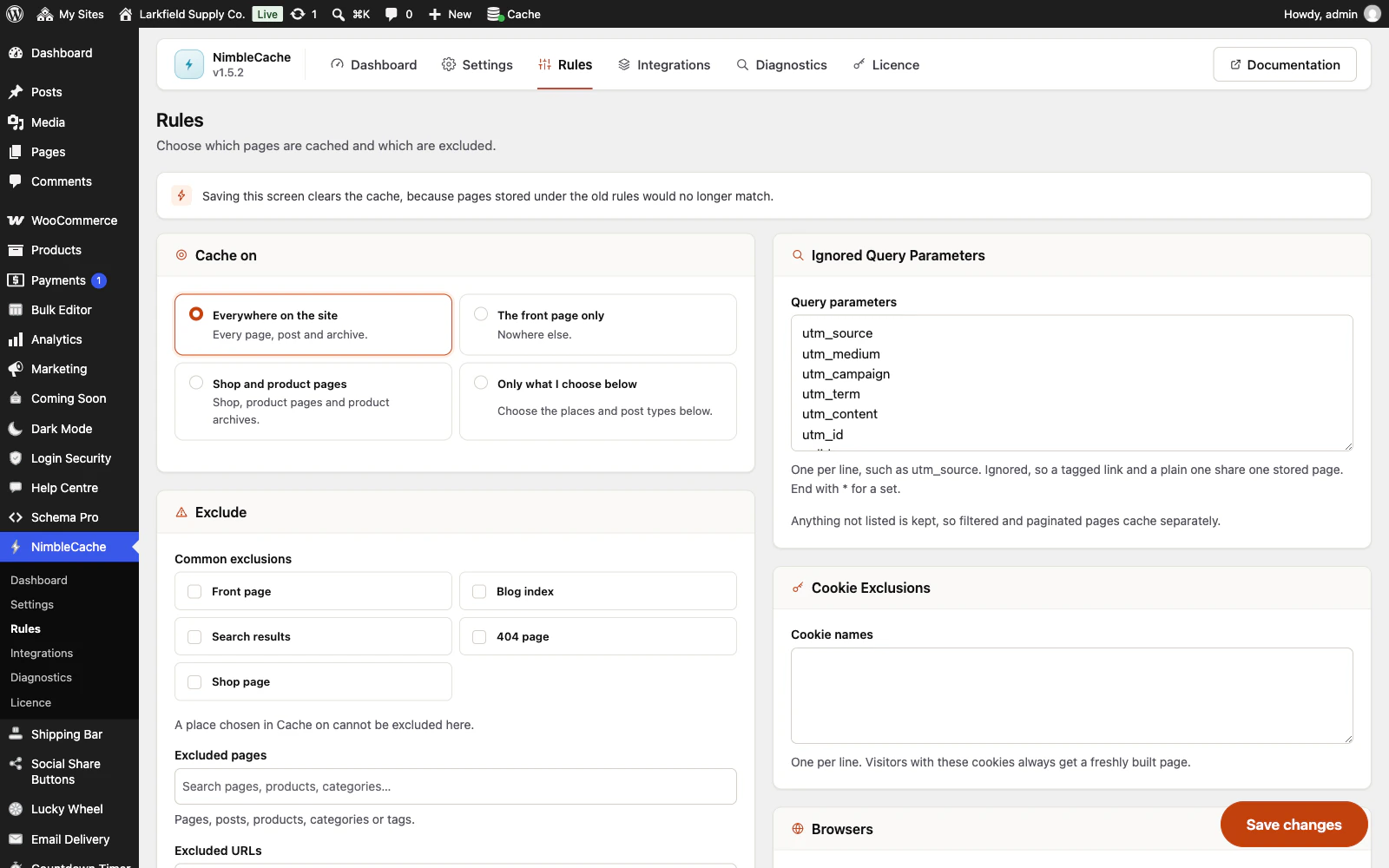
Query strings handled properly
Tracking parameters are stripped before the lookup, so an advert click and a direct visit share one cached page.
More: Query strings handled properly
Real parameters — sorting, filtering, pagination — are kept, so a filtered product list still caches separately. Most caches treat any query string as uncacheable and give up on shops.
-
Cannot be poisoned by a Host header
The cache identity is built from your site's own address, frozen when settings are saved.
More: Cannot be poisoned by a Host header
Building it from the request's Host header is the classic way a cache ends up serving one visitor a page an attacker wrote.
-
Choose exactly which pages are cached
Cache everything, or only the front page, or only the kinds of content you tick — posts, pages, products, any custom type — plus category and tag archives, plus individual pages found by searching for them.
More: Choose exactly which pages are cached
The same control every other Traslatability plugin uses to answer "where does this apply", so you already know how to work it.
-
A ceiling on how much disk it may use
Optional, and off by default because a cache is meant to grow.
More: A ceiling on how much disk it may use
Set one and the pages nobody has needed for longest are cleared first, a few at a time in the background, until it is back under. No cache has ever been improved by filling a hosting allowance.
-
Clears the cache in front of it too
Behind Cloudflare or a host's own page cache, clearing one copy is not enough.
More: Clears the cache in front of it too
Diagnostics quotes the header sent by the cache that answered and names that cache where the header says whose it is. Every page NimbleCache clears is passed on to it through Cloudflare's plugin, Nginx Helper, Proxy Cache Purge, SiteGround, Breeze, LiteSpeed Cache, Kinsta or WP Engine, each within what that plugin's own settings allow. The other cache is cleared whole only when you press Clear the whole cache, and a save does not wait for any of it where PHP runs through PHP-FPM or LiteSpeed.
-
Multilingual and multi-currency aware
A language in the address caches separately by itself.
More: Multilingual and multi-currency aware
A language held in a cookie — Polylang, WPML, TranslatePress — becomes part of the cache identity, so the first visitor's language does not decide everybody's.
Getting ahead
3 features
-
Warms pages up from your own sitemap
Optional, off by default, and deliberately unhurried: a few pages every five minutes, taken from the sitemap your SEO plugin already keeps — the list of pages the site itself says matter, with everything you set to noindex left out.
More: Warms pages up from your own sitemap
A preloader that takes the site down in order to warm it up has misunderstood the job.
-
Backs off on a small or busy server
Before any background work runs, the plugin reads what the host will actually spare — memory limit, execution limit, load average — and halves its own rate on a small host, or stands down entirely while the server is busy.
More: Backs off on a small or busy server
You never have to work out what your hosting can take, because the answer changes and the plugin asks every time.
-
Pages that open before the click
Chrome and Edge can fetch a page before it is clicked, and WordPress asks them to as a link is pressed.
More: Pages that open before the click
NimbleCache can start a cached page loading as the pointer rests on its link instead, and never fetches a page it does not cache: not the cart, the checkout, account pages or your exclusions. Signed-in visitors and shoppers with something in their cart get none of it. It builds on WordPress's own speculative loading, and adds the same on WordPress before 6.8.
Honest by default
2 features
-
Leaves nothing behind
Deactivating removes the drop-in and takes WP_CACHE back out of wp-config.php immediately.
More: Leaves nothing behind
A deactivated cache plugin with a live drop-in is a site serving pages nothing is purging — the worst state of all, and the one people find a week later.
-
Never writes to the database on a cache hit
A hit is a file read and nothing else — no counter, no statistics row, no connection.
More: Never writes to the database on a cache hit
Everything the dashboard shows is either counted from disk or recorded on the page builds, which had already paid for WordPress.
Everywhere
5 features
-
Works on a network
Activate it on one site or across a whole multisite network.
More: Works on a network
Each site keeps its own settings and its own cached pages, and a site added later is set up on its own.
-
Spanish and French included
Every string in the plugin, the admin screens and the licence page is translated into Spanish and French.
-
An admin that never reloads
Every screen in the plugin arrives without a page load, and every save happens where you are standing.
More: An admin that never reloads
WordPress fetches the whole of wp-admin's CSS and JavaScript again to change one panel; this fetches the panel. The screen you are on is still there while the next one is on its way, and the one you are heading for is usually already in hand — a pointer takes a moment to reach a menu item, and that moment is spent fetching.
-
Saved, and told so where you are looking
A save answers in the corner of the screen, bordered in the colour of what it is telling you and saying what was saved rather than just "Saved".
More: Saved, and told so where you are looking
Four seconds, and hovering holds it open. No reload, and no scrolling back to find a notice above the header three hundred pixels from the button you just pressed.
-
Tabs that change instantly
A WordPress admin request spends about a second in its own bootstrap before a plugin gets a word in, and fetching when your pointer arrives only buys back a fraction of it.
More: Tabs that change instantly
So the plugin's other screens are fetched quietly while you read the first one — one at a time, only while the browser is idle, and never on a metered connection. By the time you click a tab the answer has been in memory for seconds.
Pricing
Every plan includes every feature. Choose how many domains, and whether to pay yearly or once.
Pay yearly renews until you cancel
Pay once (lifetime) no renewals
- Every plan includes every feature. You choose only the number of domains.
- 30-day refund, no reason needed. Refund policy
- Licence key and download straight after payment, by Stripe.
- A lapsed licence stops updates and support. It never switches a feature off.
- Local, development and staging copies are free and do not count against your domains.
- Yearly plans renew at the then-current price until you cancel. Cancel any time from your account.
- Where tax applies it is calculated at checkout and shown before you pay.