


An honest countdown ends when it says it ends, and the offer really stops at that moment. Four kinds can be run honestly: a fixed date, the product's own sale end, a per-visitor timer that remembers when it started, and a daily cut-off that openly repeats. The one to avoid is a timer that starts again when the visitor comes back, which is the example the UK's competition regulator gives of a practice banned outright.
What fake urgency is, and why it is your problem#
Fake urgency is a claim that time is running out when it is not: a clock that resets on the next visit, an offer that "ends tonight" and is back tomorrow, a "today only" price that is there every day.
In the UK, the Digital Markets, Competition and Consumers Act 2024 lists 32 practices that are unfair in all circumstances. The Competition and Markets Authority's guidance on unfair commercial practices describes banned practice 7, "falsely stating that a product will only be available for a limited time ... in order to elicit an immediate decision", and its example is a countdown clock that restarts when it runs down while the offer carries on. The same guidance says that if the statement that the offer will end is true, and not otherwise misleading, "this is unlikely to be problematic", and warns that a substantially similar offer appearing again within a short period can still mislead. The CMA's earlier letter to online businesses, Using urgency and price reduction claims online, covers countdown timers by name.
The EU's Unfair Commercial Practices Directive carries the same rule in its list of practices that are always unfair (Annex I, point 7, which speaks of a "very limited time"). Other countries have their own rules. None of this is legal advice: for your own shop and market, ask someone qualified.
There is also the plain business side: a shopper who has watched one of your clocks reset has little reason to believe the next one.
Four timers that tell the truth#
A fixed date#
One moment in the calendar, the same for everyone: a launch, a Black Friday close, the last day to order for Christmas. It is honest as long as the thing it counts to really happens then. If the timer says the offer ends on Sunday at midnight, the price, the coupon or the free gift has to stop at midnight on Sunday, and not come back on Tuesday.
The product's own sale end#
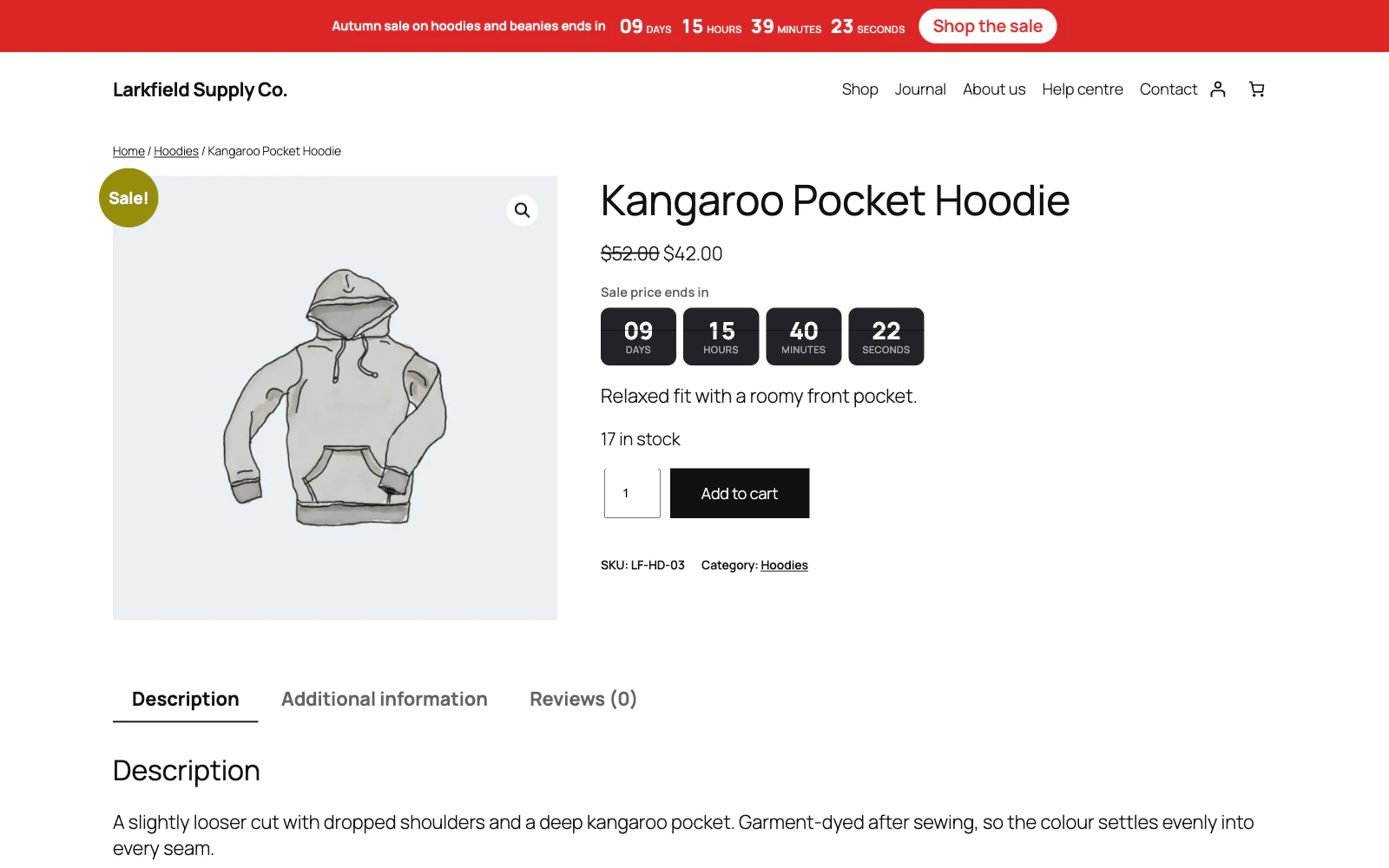
WooCommerce already knows when a sale ends. On the product screen, the Schedule link under Sale price opens Sale price dates, with From and To. WooCommerce's help text there says the sale starts at 00:00:00 on the From date and ends at 23:59:59 on the To date, by the time zone under Settings → General. A timer that reads those dates cannot disagree with the price, and a product with no end date simply has no timer. That is why it suits a shop where only some things are reduced.
A per-visitor timer that does not reset#
Often called an evergreen timer: each visitor gets, say, 48 hours from the moment they first see the offer. It is honest when two things hold. The start is remembered, so a visitor who comes back tomorrow finds the offer has ended rather than a fresh 48 hours. And what it promises really stops for that visitor at the end, which usually means a coupon that is refused once their time is up. A per-visitor clock with nothing ending behind it is fake urgency however well it remembers.
Be clear about its limits. The start usually lives in the visitor's browser, so someone who clears their cookies or switches device starts again, and nothing short of an account closes that gap. A clock built to restart on every visit is a different matter.
A daily cut-off that says it repeats#
"Order within 2 hours 14 minutes for dispatch today" is true every weekday if you dispatch every weekday. It goes wrong on a Friday afternoon, when "today" really means Monday, and on bank holidays. Name the day the order will go out rather than repeating "today", and skip the days you are closed.
The one that goes wrong: a timer that restarts#
A timer can restart without anyone meaning it to. It may count from the moment the page loaded, or keep its start somewhere that is lost when the tab closes, or count to a fixed time that somebody moves forward each evening. For the shopper the effect is the same.
Test any timer you run, whoever built it:
- Open the page in an ordinary browser window, not a private one, which forgets everything when it closes. Note the time left.
- Reload. The time should carry on from where it was.
- Close the browser completely, open it again, and go back to the page. A per-visitor timer should carry on; a fixed-date timer should show the same end as before.
- Come back after the end. The offer should be gone, at the price and the checkout as well as on the clock.
Let the price decide the clock#
The safest countdown counts to a date WooCommerce already uses to change the price, so nobody has to type the end twice. Schedule the sale with Sale price dates and have the timer, or a plain line of text, read the product's own end.
You do not need a timer to do that. This snippet adds "Sale ends Sunday 29 November at 23:59" under the price of a product page while the product is on sale with an end date. It goes in a code snippets plugin or a child theme's functions.php:
add_filter( 'woocommerce_get_price_html', 'myshop_sale_ends_line', 10, 2 );

function myshop_sale_ends_line( $html, $product ) {
	// Only under the price of the product the page is about.
	if ( ! is_product() || get_queried_object_id() !== $product->get_id() ) {
		return $html;
	}
	$ends = $product->is_on_sale() ? $product->get_date_on_sale_to() : null;
	if ( ! $ends ) {
		return $html;
	}
	return $html . sprintf(
		'<br><small class="sale-ends">Sale ends %s</small>',
		esc_html( wp_date( 'l j F \a\t H:i', $ends->getTimestamp() ) )
	);
}
We tried it on a test shop running WordPress 7.1 with the Twenty Twenty-Five block theme and WooCommerce 11.2: the product page showed the line under the price, and the shop page did not. It covers simple products; a variable product keeps its sale dates on each variation, so it shows nothing there. A date in words cannot drift the way a ticking clock can on a device whose clock is wrong, and it is the same for every visitor reading a cached page.
Two things break the link between price and clock. Changing prices with WooCommerce's own bulk edit removes the sale dates of every product whose price it changes, so check your scheduled sales after any bulk price change. And a site left on UTC while the shop trades in London runs an hour out in summer, for the sale and for any timer counting to it.
Cart timers: say what happens, and do not empty the cart#
A cart timer counts down while a shopper decides. WooCommerce does not set stock aside for what is sitting in a cart. It reserves stock once the checkout has created the order, for the minutes set in Hold stock (minutes) under WooCommerce → Settings → Products → Inventory. So "your items are reserved for 10 minutes" is only true if something reserves them. A cart timer that empties the cart at zero punishes a shopper who was about to pay, and can lose the sale. An honest cart timer says what changes at zero, such as a discount that ends, and that is all that happens.
A coupon that ends with the countdown#
If the offer is a discount code, the code has to stop when the clock does. WooCommerce's Coupon expiry date says "The coupon will expire at 00:00:00 of this date", so a code for a sale that runs to the end of Sunday 29 November needs an expiry of Monday 30 November. A countdown that ends at 18:00 cannot be matched by an expiry date alone: the code would carry on until midnight.
Doing this with Countdown Timer#
Countdown Timer is our plugin for this. Each campaign Counts to one of the four kinds above: Fixed date and time, Product sale end date (read from WooCommerce per product, including each variation's dates), Fixed length per visitor, or Daily or weekly cut-off, which skips the Days off you list and can name the day it counts to with {day} (What a campaign counts to). A per-visitor countdown keeps its start in a cookie, so it survives a page cache and a closed browser, and a visitor who comes back finds it expired rather than reset. If an offer genuinely comes round again, Repeat starts a new run daily or weekly.
On a fixed-date campaign, Buying can keep products off sale until the countdown ends, or stop them selling when it ends; the shop refuses the order and stock is never touched (Selling only while the clock allows). A coupon linked to a fixed-date or per-visitor campaign works only while that countdown runs, to the minute, and is taken off a cart at the checkout once the offer is over (A coupon that works only while the countdown runs). The cart timer can apply a real WooCommerce coupon while it runs and never empties the cart (The cart timer). Every countdown is worked out against your site's time zone (The clock, and the time zone).
What it does not do: it never changes a price, so a sale price still comes from WooCommerce's own sale dates. A per-visitor countdown starts again for a visitor who clears their cookies, comes back on another device, or has JavaScript switched off. Per-visitor, sale-date and cut-off campaigns always sell; only a fixed date can stop sales. And the cart timer reserves no stock.
A checklist before you publish a countdown#
- The offer really ends at the moment shown: the price, the coupon or the gift stops then.
- You are not planning to run substantially the same offer again straight afterwards.
- Reloading, closing the browser and coming back do not give a visitor a fresh clock.
- The site's time zone under Settings → General is the one your shop trades in.
- A cut-off timer skips the days you do not dispatch, and names the day an order goes out.
- A cart timer says what changes at zero, and empties nothing.
- The end is written in words somewhere near the clock, for anyone who cannot read the timer.
The plugin for this
 Countdown Timer
Countdown timers that run to your real sale dates, on a product, across the shop, or as a cart timer at the checkout.
From $19 a year · every feature · 30-day refund
In the documentation
- What a campaign counts to Documentation
- Selling only while the clock allows Documentation
- A coupon that works only while the countdown runs Documentation
- The cart timer Documentation
- The clock, and the time zone Documentation
- A visitor came back and the timer had restarted Knowledge base
- Can the countdown stop Add to cart? Knowledge base
- Can a coupon stop working when the countdown ends? Knowledge base
- Does it work with page caching? Knowledge base
- A product shows no countdown but its price is reduced Knowledge base
- What happens when the cart timer runs out? Knowledge base