


WordPress keeps some old addresses working on its own: rename a post or a WooCommerce product and the old address sends people to the new one. It does nothing for a renamed category, a renamed page often breaks, and after a switch from date-based permalinks to Post name every old post address answers "page not found". Those need a permanent (301) redirect from you. Below is what WordPress does by itself, case by case as we tested it, how to add the rest with or without a plugin, and how to check the result.
What WordPress redirects by itself, and what it does not#
We tried each of these on a test site running WordPress 7.1 and WooCommerce 11, and asked for the old address afterwards.
These kept working, with a 301 to the new address:
- a post whose slug was changed;
- a WooCommerce product whose slug was changed;
- after Settings → Permalinks went from Post name to Month and name, the old one-word post addresses;
- after WooCommerce's product base went from
producttoitem, the product's previous address.
These answered "page not found" (404):
- a page renamed from
teamtopeople; - a category renamed from
newstoupdates, and a WooCommerce product category renamed the same way; - every category address after the category base was changed to
topics; - every post address after the structure went from Month and name to Post name (
/2026/10/hello-world/simply stopped working); - a product address that had been through two changes, a new slug and then a new product base. The newest previous address redirected; the oldest did not.
Two mechanisms explain the pattern. When a published post, or any other content type that is not hierarchical (products included), gets a new slug, WordPress stores the old slug and redirects it. Pages are hierarchical, so they never get this. For other addresses that end in "page not found", WordPress often tries a guess: it takes the last part of the address and looks for a published post or page whose slug starts with it. Whether it gets to try depends on how the address fits your permalink rules, which is why the same kind of change redirected in one direction and not the other.
A guess can be wrong. Renaming the page about to about-us kept working only because the new slug starts with the old one. And /shoes/, an address that never existed on our test site, was sent to a post called "Shoes sale". WordPress tells you about neither.
Permanent, temporary or gone#
Use a 301 (or 308) for a page that has moved for good. Google's redirects documentation says Google treats a permanent redirect as a signal that the new address should be shown in search results.
Use a 302 (or 307) for something that will come back, such as a seasonal page. Google then keeps showing the old address.
For a page removed with nothing to replace it, let it answer 404, or 410 if you want to say it is gone on purpose. Google's page on how HTTP status codes affect its crawlers says all 4xx codes apart from 429 are treated the same: the address drops out of the index. Search Console's help adds that a 404 for a page removed without a replacement is not necessarily a problem. Where there is a replacement, send each old address to that page, not to the home page.
Redirect one renamed page or category#
- Before you rename it, copy its current address.
- Rename it. For a category, that is Posts → Categories (or Products → Categories), Quick Edit, Slug.
- Add a 301 from the old address to the new one, using one of the ways below.
- Update your own links to it: menus, buttons, links inside posts. A redirect is for other people's links.
- Check it with curl, as described further down.
On Apache, in .htaccess#
On hosting that runs Apache, WordPress keeps its address rules in a .htaccess file in the WordPress folder. Put yours above the line # BEGIN WordPress. WordPress rewrites everything between # BEGIN WordPress and # END WordPress, and the file says so, but it leaves the rest alone.
# Redirects added by hand. Keep them above the WordPress block.
<IfModule mod_rewrite.c>
RewriteEngine On
RewriteRule ^team/?$ /people/ [R=301,L]
RewriteRule ^category/news/?$ /category/updates/ [R=301,L]
</IfModule>
R=301 makes the redirect permanent, L stops Apache looking further, and anything after a ? in the old address is passed on. Apache's guide to redirecting and remapping explains the rest.
On nginx#
nginx does not read .htaccess. The rules go in your site's server { } block, which on managed hosting may mean asking your host:
rewrite ^/team/?$ /people/ permanent;
rewrite ^/category/news/?$ /category/updates/ permanent;
permanent gives a 301 and keeps the query string. See the nginx rewrite module.
Without touching server files#
Some hosts offer a redirects screen in their control panel. The free Redirection plugin on WordPress.org manages redirects from wp-admin, and its page says it can watch for changed post and page permalinks and keep a log of 404s.
After changing the permalink structure#
Switching from Day and name or Month and name to Post name breaks every old post address, as the test above showed. One rule per old format brings them all back. For Apache:
RewriteRule ^[0-9]{4}/[0-9]{2}/([^/]*[^0-9/][^/]*)/?$ /$1/ [R=301,L]
RewriteRule ^[0-9]{4}/[0-9]{2}/[0-9]{2}/([^/]+)/?$ /$1/ [R=301,L]
And for nginx:
rewrite "^/[0-9]{4}/[0-9]{2}/([^/]*[^0-9/][^/]*)/?$" /$1/ permanent;
rewrite "^/[0-9]{4}/[0-9]{2}/[0-9]{2}/([^/]+)/?$" /$1/ permanent;
The first line of each handles Month and name (/2024/03/hello-world/), the second Day and name (/2024/03/22/hello-world/). The odd-looking middle of the first rule makes it skip WordPress's own day archives such as /2024/03/22/, which are all digits. We tested all four lines on Apache 2.4 and nginx 1.26: post addresses redirected, archive addresses were left alone.
A new category base needs one more line, here for a base changed to topics:
RewriteRule ^category/(.+)$ /topics/$1 [R=301,L]On nginx that is rewrite ^/category/(.+)$ /topics/$1 permanent;. If you also have a rule for one renamed category, put that one first, or visitors make two hops.
For WooCommerce's product base, WordPress's guess found the new address in our test of a single change. Check yours with curl rather than counting on it. The WordPress permalinks documentation lists the structure tags if your old format was something else.
Move a whole section with one rule#
To send everything under /blog/ to the same address under /news/:
RewriteRule ^blog/(.*)$ /news/$1 [R=301,L]On nginx, rewrite ^/blog/(.*)$ /news/$1 permanent;. In our test /blog/hello/ went to /news/hello/, and a campaign tag after the ? came along. Keep patterns this plain unless you really need more.
Check your redirects without clicking around#
Browsers keep 301s (RFC 9110 makes them cacheable by default), so clicking an old link in your own browser can show you yesterday's answer. Ask from a terminal instead:
curl -sI https://www.example.com/team/You want 301 on the first line and a location: header with the new address. A header x-redirect-by: WordPress means WordPress, or a plugin using WordPress's redirect function, sent it; a redirect from .htaccess or nginx has no such line.
To follow the whole chain:
curl -sIL https://www.example.com/team/ | grep -iE "^HTTP|^location"One 301, then a 200, is the goal. Google's site move guide says Googlebot follows up to 10 hops but advises redirecting to the final destination directly, and keeping any chain "ideally no more than 3 and fewer than 5". A loop shows up as an error about too many redirects.
Find what is still breaking#
In Search Console, the Page indexing report lists addresses under "Not found (404)". Google's help for that report suggests fixing the 404s you link to yourself or list in a sitemap, and using a 301 where a page has moved.
Your server's access log has the rest. For the common "combined" log format, this lists the addresses that answered 404, busiest first:
awk '$9 == 404 {print $7}' access.log | sort | uniq -c | sort -rn | head -20Keep the redirects you add. Google's site move guide says to keep them for at least a year, and from your visitors' point of view, indefinitely.
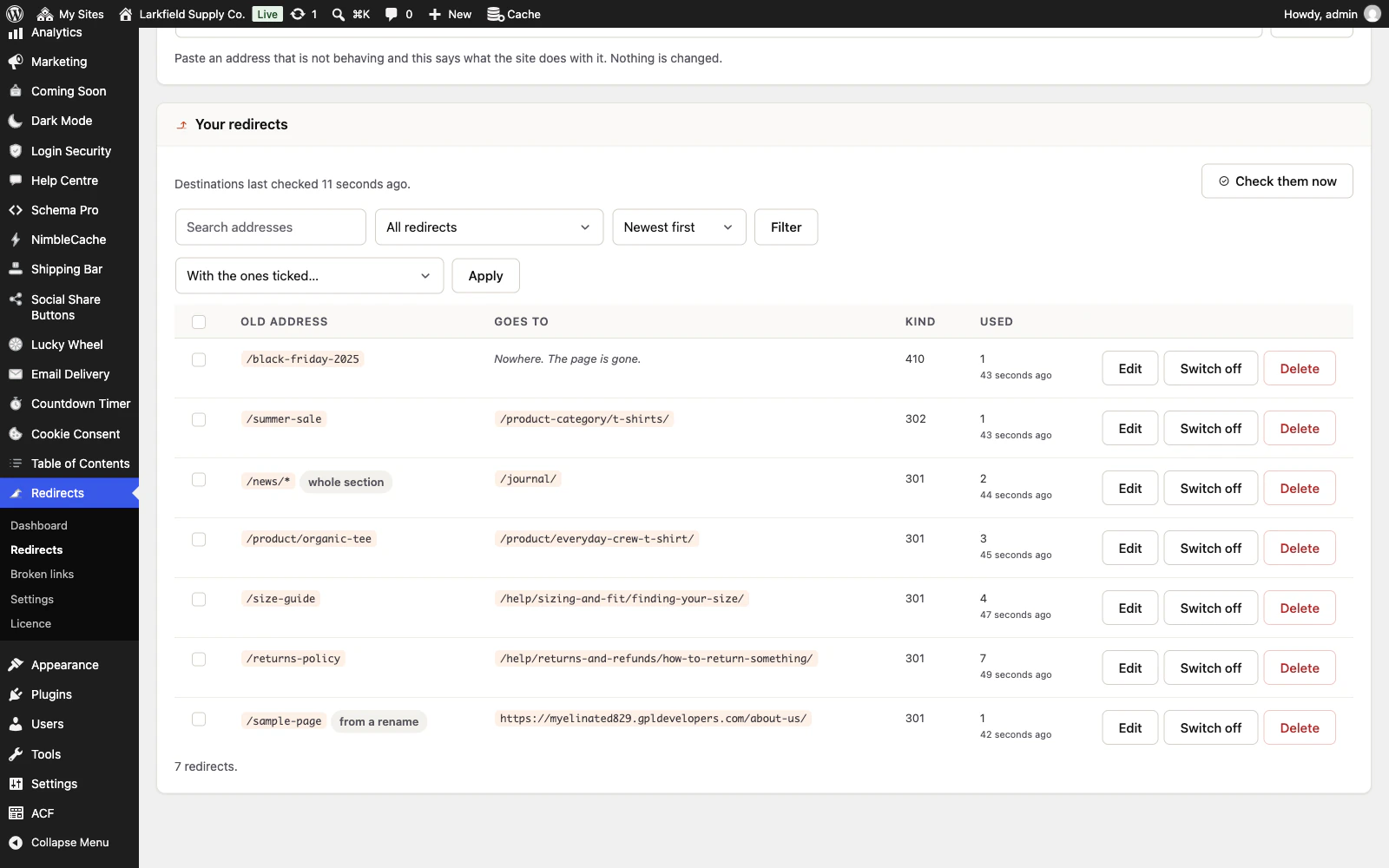
Doing it with Redirects#
Redirects does most of the above from the moment it is active, as its documentation describes:
- Renaming a published page, or a category, tag or WooCommerce product category, makes a redirect from the old address at the moment you save (Renamed pages, Renaming a category). Rename it again and the first redirect is moved along, so there is never a chain of two.
- After a change to the permalink structure, or to the category, tag or product base, an old-style address that WordPress cannot find is sent with a 301 to where that post, category or product lives now, and saved in the list. A post is matched only when the old address's date, category and author fit it, so a newer post with the same name is never the destination by mistake (Changing your permalinks). A change made before you installed it can be typed in under Older structures.
- Broken links lists every address people ask for and do not find, busiest first, with the page that linked to it (Broken links).
- Test an address shows what the site does with any address without visiting it, and a weekly check marks redirects whose destination is not found, points at another redirect, or goes round in a circle, with a button to point a redirect straight at its final address (Checking your own redirects).
- A section rule ending in a star, such as
/blog/*, moves a whole section. - Redirects kept by Redirection, Rank Math, Yoast SEO Premium or Safe Redirect Manager can be previewed and imported (Coming from another redirect plugin).
What it does not do: it cannot know where a deleted page or category should go, so it puts the address on Broken links for you to decide. Pages are left out of the permalink handling, since WordPress gives a page the same address whatever the structure (unless the structure starts with index.php), and feeds, second pages of a list, and author and date archives are not followed. On a site with plain permalinks, a tag's or product category's ?tag= style address is not kept. It refuses rules over /wp-admin, /wp-login.php and /wp-json. The weekly check does not judge destinations on other sites or section rules. And a cache WordPress cannot reach, such as your host's own, keeps its copy until it expires or you empty it.
Check it worked#
- Every old address you know about answers
301and reaches a200in one hop (curl -sIL). - Menus and links inside your own pages point at the new addresses directly.
- Pages removed for good answer 404 or 410 rather than redirecting to the home page.
- A week later, Search Console's "Not found (404)" list and your access log show nothing you still want to keep.
- The redirects stay in place for at least a year.
The plugin for this
 Redirects
Rename a page without losing the links to it — and see every address on your site that is breaking.
From $19 a year · every feature · 30-day refund
Keep old addresses working without writing rulesRead the docs
In the documentation
- Renamed pages Documentation
- Renaming a category Documentation
- Changing your permalinks Documentation
- Adding a redirect Documentation
- Checking your own redirects Documentation
- Broken links Documentation
- Coming from another redirect plugin Documentation
- What is a redirect, in plain words? Knowledge base
- I renamed a page. Do I need to do anything? Knowledge base
- I changed my permalink structure. Do I need to do anything? Knowledge base
- I renamed a category. Do I need to do anything? Knowledge base
- Which kind should I choose? Knowledge base
- My redirect does not seem to work Knowledge base
- How do I move a whole section? Knowledge base